

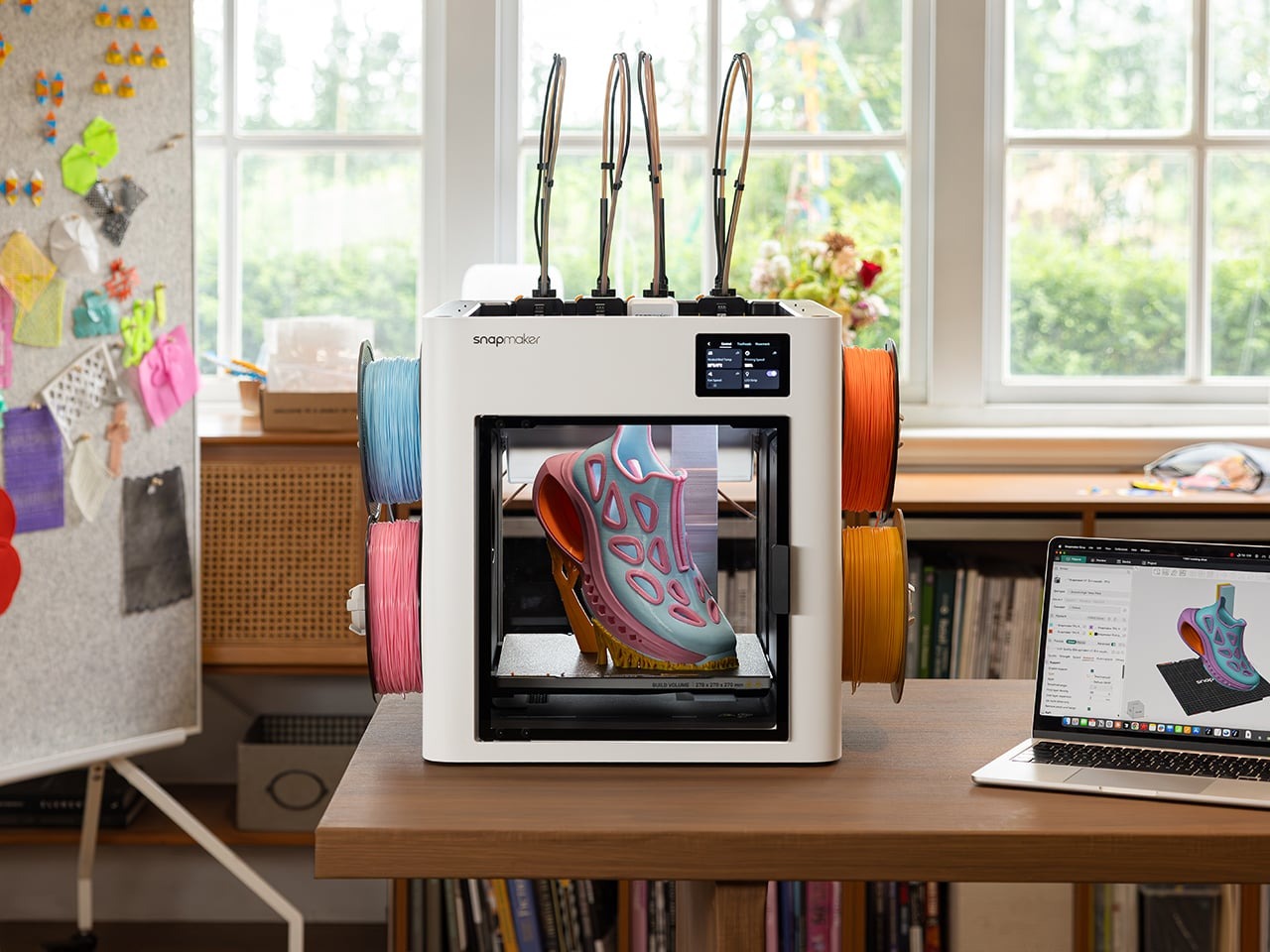
The Snapmaker U1 is a high-speed desktop 3D printer featuring an active four-toolhead mechanical swapping architecture engineered to execute multi-color and multi-material additive manufacturing without the extreme filament waste endemic to single-nozzle systems. Currently marked down to $699 USD direct from Snapmaker’s official store for its Black Friday promotion—a notable 30% drop from its standard $999 USD MSRP—this hardware target creators, small-batch fabricators, and desktop prosumers who require rapid material transitions for production runs. This matters because it signals the shift toward democratized tool-changing mechanics, bringing a category of hardware that once cost thousands down to mainstream pricing.
🛒 Where to Buy: Creality 3D Printer
- Creality 3D Printer: View on Amazon
Click the link above to check current pricing, availability, and customer reviews on Amazon.
For years, multi-color desktop 3D printing has suffered under the structural compromise of single-nozzle automatic material systems. Popular single-nozzle setups achieve multi-color output by retracting, cutting, and purging filament down a waste chute every single time a layer demands a color shift. The Snapmaker U1 rejects this approach entirely. By parking four fully independent, pre-heated print heads on a top rail, the hardware swaps tools in roughly 5 seconds via a mechanical ball-coupling interface. Evaluating what this hardware signals for the desktop additive manufacturing space today reveals an aggressive shift: tool changers are no longer high-end commercial novelties, but practical tools for high-efficiency desktop fabrication. Initial product disclosures and reporting were tracked via Yankodesign.
Upfront Investment & 2-Year Total Cost of Ownership
At an entry price of $699 USD during promotional cycles and a standard list price of $999 USD, the Snapmaker U1 establishes an exceptionally low barrier to entry for active tool-changing hardware. When calculating the total cost of ownership over a standard two-year operational lifespan, the initial hardware expenditure tells only half the story. The primary financial metric for any multi-color 3D printer is long-term filament consumption. Single-nozzle multi-material systems frequently waste between 50% and 200% of the model’s actual weight in purged plastic material—colloquially known in the maker community as filament “poop.” On complex models with hundreds of color changes, users routinely discard full spools of plastic directly into the waste bin.
By contrast, Snapmaker’s tool-swapping engineering reduces purge mass by up to 85%, restricting filament clearing strictly to initial calibration sequences and minor prime tower wipes. A prosumer printing roughly 50 multi-color models per year can expect to consume approximately 15 to 20 fewer kilograms of waste filament compared to a single-nozzle alternative. At an average cost of $25 USD per kilogram for quality PLA or PETG spools, this efficiency yields between $375 USD and $500 USD in direct raw material savings over two years. The hardware effectively recoups a massive portion of its upfront retail price simply by keeping usable plastic on the build plate rather than inside a collection basket.
Maintenance outlays over a 24-month horizon remain surprisingly manageable, though users must account for wearable mechanical components unique to multi-head systems. While traditional printers require upkeep on a single hotend assembly, the U1 utilizes four individual hotend modules. Spare nozzle assemblies, silicone socks, and replacement PEI flexible build plates represent an estimated ongoing upkeep budget of roughly $80 USD to $120 USD annually. Electrical power consumption is slightly elevated during initial heating cycles due to pre-warming multiple toolheads simultaneously, but the dramatic reduction in total print job duration offsets energy draw over long multi-color print runs.
What You Actually Get: Core Features & Build Specs
Unboxing the hardware reveals an industrial-grade frame designed around high-velocity motion control and micro-metric alignment. According to technical documentation published with this release, the Snapmaker U1 incorporates the proprietary SnapSwap tool-changing mechanism, which docks four individual extrusion heads along the upper gantry. Each print head features its own dedicated direct-drive extruder, thermal sensor, and heating element. When a sliced file calls for a material or color change, the gantry locks into the target head, releases the mechanical latch via a hardened steel-ball coupling mechanism, and engages the active head in a seamless five-second motion. The manufacturer claims this mechanical coupling survived over one million continuous swaps under laboratory testing with zero mechanical failures.
Precision calibration across multiple print heads has historically represented the single largest headache for tool-changing 3D printers. Snapmaker addresses this through an automated toolhead alignment procedure that calibrates offset tolerances across all four nozzles down to 0.04mm (approximately 0.0016 inches). This extreme spatial accuracy ensures that multi-color seams remain crisp, preventing color bleed between adjacent geometries. Motion is managed via standard Klipper firmware integration, utilizing input shaping algorithms and active vibration compensation to allow print head velocity to scale up to 500mm/s with acceleration limits configured for rigid wall output.
The operational feature set extends well beyond mechanical tool swapping. The core hardware specifications and included package assets emphasize immediate out-of-box functionality for desktop creators:
- Extrusion Architecture: Quad-independent direct-drive toolheads featuring quick-swap hotends and hardened drive gears.
- Maximum Print Velocity: Up to 500mm/s top speed with input shaping enabled via onboard Klipper processing.
- Alignment Tolerance: Automated inductive X/Y/Z toolhead calibration accurate to within 0.04mm.
- Filament Detection: Automatic RFID reader integration for native Snapmaker spools alongside smart spool failover Backup Mode.
- Out-of-Box Hardware Bundle: Ships with four 1kg spools of PLA filament, a textured dual-sided PEI build plate, and 30 pre-tested multi-color digital models.
- Monitoring Suite: Integrated high-definition chamber camera running real-time AI spaghetti detection and mobile telemetry alerts.
- Software Pipeline: Direct compatibility with OrcaSlicer via the customized Snapmaker Orca distribution, alongside Klipper web interface access.
For advanced multi-color work, Snapmaker introduces a software-level rendering technique called Full Spectrum layer blending. Rather than relying solely on four solid filament shades, the slicer can stack micro-thin alternating layers of your four loaded materials. This optical trick tricking the human eye into perceiving secondary shades and subtle gradient shifts directly on printed surfaces. When loaded with primary spools of red, yellow, blue, and white filament, the printer expands its usable palette far beyond basic four-color boundaries without requiring extra hardware modifications.
Hidden Costs, Ecosystem Dependencies & Fine Print
Examining the fine print of the hardware documentation reveals a few crucial mechanical realities that potential buyers must evaluate before purchasing. While single-nozzle printers feature simple maintenance paths, maintaining four active toolheads increases the number of potential failure points. Each individual head houses its own heating block, thermistor wire harness, and drive motor. If a nozzle experiences a heat-creep clog mid-print, the error halts that specific toolhead, requiring manual intervention to clear the jam. Users transitioning from basic single-head hardware must adapt to managing multi-extrusion offsets and periodic cleaning of four distinct nozzle tips.
Software reliance presents another ecosystem dependency worth noting. While the open-source Klipper backend grants tinkers full terminal control over macros and motion parameters, the cloud-based model repository, Snapmaker Space, remains in an open beta testing state. Users looking for seamless single-click printing will find the official cloud ecosystem still maturing, making local slicer workflows inside Snapmaker Orca or standard OrcaSlicer mandatory for achieving optimal tool-pathing and layer retraction tuning. Creators working with multi-material combinations, such as fusing rigid PLA structures with flexible TPU grips or soluble PVA support towers, must manually configure thermal profiles to prevent heat contamination across parked heads.
Physical footprint and thermal control also demand workspace planning. Because the gantry must accommodate four docked toolheads across its top width, the outer physical dimensions of the chassis are wider than standard single-nozzle CoreXY machines offering similar build volumes. The stock enclosure manages ambient temperatures suitable for PLA, PETG, and TPU printing; however, high-temperature engineering filaments like ABS or ASA will require careful thermal management due to the lack of an actively heated chamber circuit. Buyers operating in drafty environments may need to invest in optional thermal covers to prevent warp failures on long multi-material jobs.
Smarter Alternatives at This Price
To understand where the Snapmaker U1 sits in the modern additive manufacturing space, buyers must weigh it directly against established market rivals offering multi-material capabilities around similar price points. The desktop multi-color landscape is split between single-nozzle purge systems and dedicated multi-toolhead changers.
The primary direct competitor in the enclosed high-speed segment is the Bambu Lab P1S Combo with AMS, which retails for $949 USD on Amazon and direct from the manufacturer. The P1S Combo utilizes an automatic material system that feeds four spools into a single hotend. The Bambu ecosystem provides a polished software package, exceptional out-of-box reliability, and a fully enclosed print chamber. However, its single-nozzle architecture introduces two massive structural drawbacks: lengthy multi-minute filament flush cycles during every color change and substantial plastic waste. A complex four-color print on the P1S can spend hours simply purging filament down its rear chute, generating hundreds of grams of discarded plastic. The Snapmaker U1 completely eliminates these micro-purges, executing swaps in just 5 seconds and dramatically reducing total print execution time.
On the opposite end of the mechanical spectrum sits the Original Prusa XL Multi-Toolhead, available starting at $1,999 USD in semi-assembled kit form or $2,499 USD fully assembled direct from Prusa. The Prusa XL is widely regarded as the industrial benchmark for desktop tool changing, featuring an expansive 360mm cubic build volume, segmented heated bed, and modular support for up to five Nextruder toolheads. While the Prusa XL offers superior open-source hardware modularity and larger build dimensions, its multi-thousand-dollar price tag positions it strictly as a commercial investment for prototyping labs. The Snapmaker U1 captures the core mechanical benefit of Prusa’s tool-changing architecture—rapid, zero-waste multi-material swaps—at less than half the upfront cost of entry, making multi-tool fabrication practical for hobbyist budgets.
Final Buyer Verdict: Is the Investment Worth It?
If this generation of tool-changing hardware successfully validates long-term mechanical reliability at the sub-$700 USD mark, the broader arc of hardware design suggests single-nozzle material flush systems could become completely obsolete for multi-color production over the next cycle. The Snapmaker U1 represents a pivotal step in this evolution. By marrying open Klipper firmware, high-speed gantry motion, and a robust mechanical coupling system that swaps heads in 5 seconds, Snapmaker delivers the precise operational benefits makers have demanded for years: lower material overhead, reduced job completion times, and true multi-material capabilities including rigid-and-flexible composite builds.
The Snapmaker U1 is an outstanding purchase for active makers, Etsy shop owners, product designers, and holiday gift fabricators who regularly execute complex multi-color models and want to stop burning money on discarded filament purges. The promotional Black Friday price of $699 USD on the official store renders it one of the strongest value propositions in desktop fabrication. Conversely, casual users who print strictly single-color functional parts, or beginners who prefer a plug-and-play app ecosystem over managing multi-tool calibrations, should pass on this hardware in favor of basic single-nozzle enclosed units. For those ready to step up to true tool-changing performance without paying enterprise prices, the U1 earns an enthusiastic buyer recommendation.