

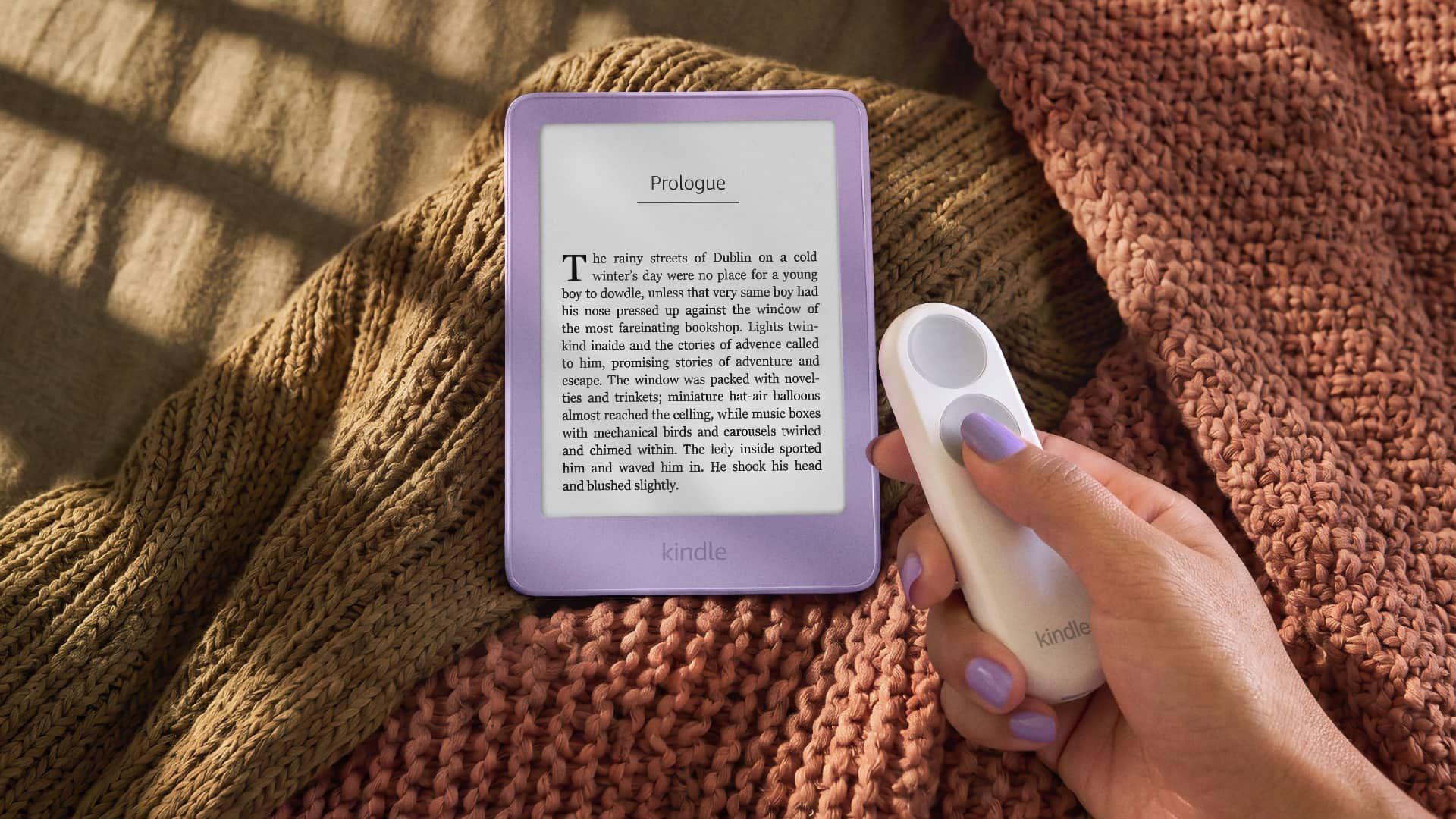
Amazon Kindle e-readers, priced at Amazon Kindle Paperwhite Signature Editionstarting at $199 USD on Amazon, target dedicated readers seeking an distraction-free digital library without the tactile fatigue of continuous screen touching. For a decade, the consumer tech landscape watched electronic paper devices shed their remaining mechanical controls in pursuit of uniform minimalist profiles. Historically speaking, the industry’s wholesale pivot to capacitive touchscreens eliminated tactile page-turn keys entirely, leaving a distinct cohort of long-term users stranded with glass-and-plastic slabs that demanded constant fingerprint-smudging gestures. Examining recent hardware announcements from Amazon reveals a calculated engineering pivot: the introduction of dedicated physical page-turning hardware via the Amazon Kindle Clickremote and the specialized Page-Turn Cover. This development directly addresses a persistent ergonomic grievance for readers who found the total erasure of tactile buttons to be a step backward in functional design.
🛒 Where to Buy: Amazon Kindle Click
- Amazon Kindle Click: View on Amazon
Click the link above to check current pricing, availability, and customer reviews on Amazon.
The distinction matters here because Amazon’s previous software-based compromises failed to satisfy users who required precision navigation. Earlier in the year, the platform introduced an accelerometer-based double-tap gesture, attempting to let users advance pages through minor physical jolts to the chassis. In practice, that software adjustment proved frustratingly asymmetrical, permitting forward navigation only while withholding reverse traversal, which forced readers into a jarring workflow mismatch whenever they needed to re-read a passage following a page break. Reviewing technical documentation published with this release clarifies why hardware intervention became necessary. Rather than attempting to force software gestures to mimic physical keys, Amazon designed two distinct hardware pathways to restore tactile feedback: a snap-on physical accessory interface and an external Bluetooth controller. This dual approach signals a mature acknowledgment that reading ergonomics involve physical muscle memory as much as pixel density and backlight temperature. Initial product disclosures and reporting were tracked via Androidpolice.
Real-World Context and Target Buyer Profile
The physical device functionality centers squarely on restoring tactile navigation to users who read for extended blocks of time in sedentary environments. The target buyer profile encompasses two distinct demographics: long-standing e-reader veterans who abandoned their early-generation hardware with reluctance, and users with limited motor dexterity who find continuous screen poking physically exhausting. For these demographics, holding an e-reader stationary while operating a separate physical control or gripping an extended bezel with embedded mechanical switches transforms the reading posture entirely. The Amazon Kindle Clickremote, retailing at $49.99 USD on Amazon, allows users to cozy up under blankets with the device resting in their lap, eliminating the need to keep a thumb hovering directly over a capacitive glass touch panel. This specific workflow solves the physical fatigue associated with propping up a lightweight tablet for hours on end.
Furthermore, examining the fine print of the hardware documentation reveals a strategic focus on accessibility that Amazon has largely left unaddressed since the retirement of the physical-button Kindle Oasis line. Readers whose hands experience fatigue or motor control degradation have historically struggled with the swipe-and-poke paradigm of modern touchscreens. The integration of mechanical controls via the Kindle Click and the proprietary Page-Turn Cover opens up digital reading to a neglected demographic. By decoupling page-turning actions from the fragile glass display plane, Amazon has engineered a practical bridge between modern electronic ink technology and the comfortable ergonomics of traditional bound volumes. The target buyer is no longer forced to choose between high-resolution front-lit screens and comfortable, button-driven navigation.
Hardware Engineering, Materials, and Core Specs
Analyzing the manufacturer spec sheet for the hardware additions highlights a divergence in how these two accessories interface with the broader Kindle ecosystem. The Page-Turn Cover wraps around the front and back of compatible e-readers while extending half an inch to the left of the chassis to accommodate two mechanical page-turn buttons reminiscent of legacy models. However, technical limitations govern its compatibility: this physical cover interfaces exclusively with 2026 hardware iterations, specifically the Signature Editions of the Paperwhite and Colorsoft series. The physical connection relies on a dedicated set of pogo pins located on the rear chassis of those specific models, bypassing Bluetooth entirely in favor of a direct physical data path. This structural requirement means owners of 2024 or earlier hardware must look elsewhere for physical button integration.
That engineering constraint makes the Amazon Kindle Clickthe more versatile hardware option for the existing installed base of e-reader owners. Operating over a low-energy Bluetooth connection, the Kindle Click is compatible with any Kindle model released from 2024 onward. The palm-sized remote packs a rechargeable battery engineered to endure for weeks on a single charge, replenishing via a standard USB-C port. Beyond basic page traversal, the remote features dedicated side buttons that permit direct screen brightness adjustments, removing the need to drill down into drop-down menus mid-chapter. Pressing both side buttons simultaneously dispatches a sleep command to the e-reader, and the included wrist lanyard prevents accidental drops during active tasks like cooking or indoor exercise routines.
Everyday Usability & Design Compromises
Operating these accessories in daily reading routines exposes several deliberate engineering trade-offs. The Page-Turn Cover, while offering a seamless mechanical experience via pogo pin connectivity, adds physical bulk and weight to devices that engineers spent years making thinner and lighter. The 2026 Kindle bodies measure roughly a millimeter trimmer than their predecessors, but snapping on an extended cover with a mechanical spine negates some of those minimalist gains. Additionally, the elimination of magnetic charging on this year’s Signature Edition models in favor of the pogo pin array means users must abandon legacy wireless charging stands unless they upgrade to the new official charging dock, representing a minor friction point for households already invested in third-party magnetic ecosystems.
Meanwhile, the Kindle Click introduces a different set of behavioral adaptations. Carrying an auxiliary remote requires a conscious effort to keep track of a separate peripheral, contrasting with the all-in-one convenience of built-in bezel buttons. While the lanyard mitigates the risk of misplacement during active use, desktop clutter remains a minor consideration for minimalist readers. Yet, the ability to control illumination levels and page advances without shifting one’s grip under a heavy quilt outweighs the slight inconvenience of managing a matchbox-sized remote. The engineering balance achieved here favors functional flexibility over absolute device minimalism, catering directly to readers who prioritize ergonomic comfort above all else.
Category Alternatives and Value Comparison
Evaluating these accessories within the broader e-reader market requires examining how rival brands approach physical controls. Historically, premium alternative hardware like the Kobo Libra Colour, priced at $219.99 USD on Amazon, has maintained physical page-turn buttons directly integrated into an asymmetric chassis as a primary selling point against Amazon’s touchscreen monopoly. Kobo’s approach bakes mechanical keys permanently into the plastic molding, appealing directly to users who reject add-on accessories entirely. For buyers committed strictly to the Kindle ecosystem, however, switching platforms means abandoning synchronized reading lists, Audible integrations, and established cloud libraries, making Amazon’s new hardware accessories a necessary bridge rather than a wholesale migration.
Another prominent alternative in the premium segment is the Kobo Clara Colour, retailing at $149.99 USD on Amazon, which relies on a traditional compact touchscreen design comparable to standard Paperwhite configurations. When stacked against these integrated rivals, Amazon’s strategy of offering modular accessories—the $49.99 USD Kindle Click remote and the pogo-pin Page-Turn Cover—presents a modular economic calculation. Rather than forcing an entire hardware upgrade just to secure tactile buttons, existing owners of recent-generation hardware can spend a fraction of the cost on a Bluetooth remote. This modular path preserves capital for consumers who already own modern e-readers while still addressing the long-standing ergonomic demand for physical navigation.
Final Buyer Verdict: Long-Term Ownership Value
Long-term ownership value for these accessories hinges entirely on an individual’s reading habits and current hardware generation. For owners of 2024 hardware and newer, the Amazon Kindle Clickat $49.99 USD on Amazon represents a low-risk, high-utility investment that instantly rectifies the ergonomic limitations of touchscreen-only e-readers without demanding a full device upgrade. The inclusion of brightness controls and sleep shortcuts elevates the palm-sized remote from a simple clicker to a comprehensive companion device for stationary reading sessions, particularly for users with limited motor dexterity or those who prefer hands-free positioning under blankets or at a desk.
Conversely, the Page-Turn Cover serves as a more specialized acquisition best reserved for buyers purchasing the 2026 Signature Editions of the Paperwhite or Colorsoft who demand an integrated, button-flanked reading experience reminiscent of classic hardware. While the elimination of legacy magnetic charging requires a minor adjustment for multi-device households, the return of tactile page-turning mechanics justifies the transition. Ultimately, Amazon has successfully addressed years of consumer feedback by offering pragmatic hardware solutions that restore physical control to electronic reading, cementing a more inclusive and ergonomic future for the product category.