

Core Disclosure & Hardware Announcement
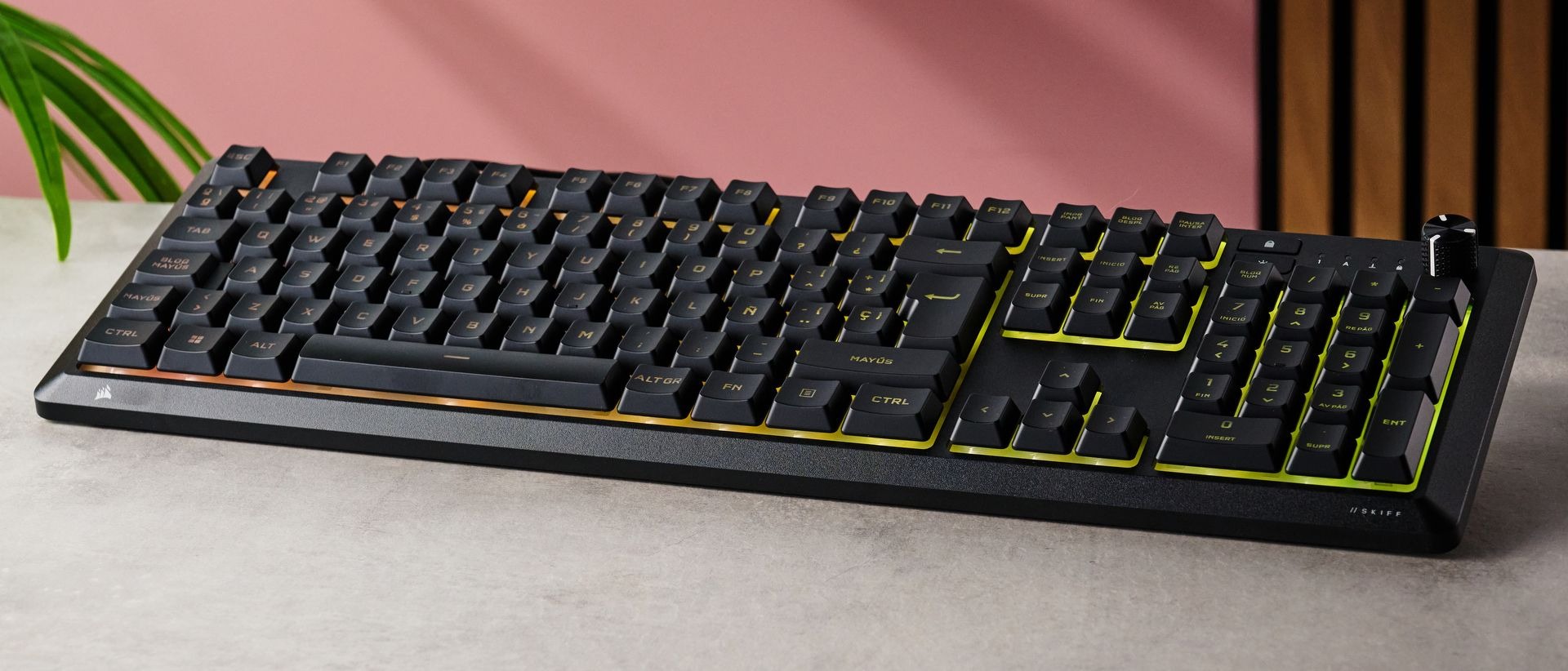
The Corsair Skiff 100is a full-size, hardwired desktop keyboard featuring low-profile keycaps, dampened membrane switches, customizable RGB backlighting, and an included detachable palm rest designed for everyday productivity and casual gaming. Retailing at $59.99 USD (£49.99 GBP) direct from Corsair and major outlets on Amazon, this peripheral is engineered for budget-conscious families, remote workers, students in dorm environments, and practical builders who want a complete desktop typing deck without paying top-dollar mechanical prices. It connects via a integrated 1.8-meter hardwired USB-A rubber cable, eliminating the hassle of battery charging routines, latency spikes, or lost wireless receiver dongles.
🛒 Where to Buy: Corsair Skiff 100
Editorial Note & Product Verification: The Cool Great Buys editorial desk independently verifies manufacturer technical specifications, cross-checks active retail availability across authorized sellers, and evaluates verified consumer reliability data before publishing product evaluations. All featured prices and promotions reflect active market rates at the time of publication.
- Corsair Skiff 100: View on Amazon
Click the link above to check current pricing, availability, and customer reviews on Amazon.
For a normal household balancing working from home, homework assignments, and weekend gaming sessions, spending upwards of $150 USD on a boutique custom mechanical keyboard is rarely a practical financial decision. Corsair positioned the Skiff 100 precisely at the sub-$60 USD entry threshold, offering a complete 104-key board equipped with a full numeric pad, dedicated media dials, discrete lighting shortcuts, and IP53 splash resistance. In a hardware ecosystem where budget choices increasingly force buyers into tiny form factors, cramped layouts, or flimsy plastic shells, this unit provides a balanced feature set tailored for living room desks, home offices, and shared family computer stations. Initial product disclosures, market positioning details, and launch announcements were tracked via Techradar.
Unboxing the unit reveals a understated, stealthy dark aesthetic that avoids hyper-aggressive “gamer” branding. Instead of sharp geometric angles or blinding plastic accents, the frame presents clean lines and soft corners that look entirely appropriate alongside an enterprise dock or professional office setup. The packaging includes the core deck, the magnetic-style snap-in wrist support, a quick-start reference guide, and safety compliance documentation. Setup requires no mandatory installation drivers; plugging the USB connector into a standard port yields immediate operational status across Windows, macOS, and ChromeOS desktop environments.
Manufacturer Claims vs. Engineering Reality
In official product documentation, Corsair highlights the Skiff 100 as a high-performance membrane board that delivers snappy key response alongside whisper-quiet sound dampening. In plain English, membrane keyboards rely on a continuous rubber dome sheet under the keys rather than individual mechanical switches with metal contact leaf springs. While purists often criticize basic membrane designs for feeling mushy or inconsistent, the engineering reality here is surprisingly refined. The keystrokes feature a shortened total travel distance of approximately 2.7mm—compared to standard full-travel mechanical switches at 4.0mm—paired with secure keycap stem guidance. This structure prevents key wobble and provides a tactile, cushioned landing that minimizes noise during late-night typing sessions.
The manufacturer also boasts software flexibility through both the lightweight Corsair Web Hub browser tool and the full desktop iCUE software suite. The Web Hub utility leverages modern WebHID browser standards, allowing users to remap key assignments, record basic macros, and customize backlighting zones directly inside Chrome or Edge without installing software packages. This capability is a massive quality-of-life advantage for remote employees using locked-down corporate laptops where administrator privileges prevent installing third-party utilities. For full desktop setups, downloading the comprehensive iCUE suite unlocks deeper system integration, real-time temperature telemetry lighting profiles, and dynamic lighting synchronization across Corsair fans and peripherals.
From a performance stance, the board supports a standard 1kHz (1,000Hz) USB polling rate, translating to a crisp 1-millisecond signal response window. While high-end gaming peripherals heavily market 4kHz or 8kHz polling rates, a 1kHz rate is more than sufficient for fast-paced competitive titles like Counter-Strike 2, Valorant, or League of Legends while ensuring zero CPU overhead or driver compatibility glitches on modest office PCs. Additionally, the internal controller features a tuned 12-key rollover matrix optimized for traditional gaming keys. During testing with simultaneous WASD, Shift, Control, Spacebar, and numeric inputs, the board registered every keystroke accurately without triggering ghosting errors or missed commands.
What caught my eye reading the full spec sheet is the official IP53 ingress protection rating. This certification means the physical deck is tested to resist dust accumulation and direct water sprays up to 60 degrees from vertical. For anyone who keeps a morning coffee, energy drink, or water bottle near their workstation, that splash resistance provides real protection against accidental spills. Underneath the keycaps, liquid-guiding channels route accidental spills safely away from internal circuit boards and out through drainage ports near the bottom edge. However, the fine print reveals that while the keyboard body is splash-resistant, the included soft-touch rubber palm rest acts as a natural static magnet for dust and pet hair, requiring frequent wiping with a damp cloth or lint roller to stay visually clean.
Under the Hood: Technical Architecture and Build Quality
Examining the physical chassis, the Skiff 100 measures 18 x 5.6 x 0.8 inches (457 x 142 x 20mm) without the palm rest attached, expanding to a depth of 9.1 inches (232mm) when the wrist support is locked into place. Despite its all-plastic construction, the internal tray incorporates reinforcing structural ribs that keep the chassis from squeaking or flexing under heavy palm pressure. Corsair selected a fine-grain textured matte finish across the main top frame that resists oily fingerprint smudges, keeping the overall weight remarkably light at under two pounds (860 grams). This lightweight construction makes it convenient to shift the keyboard aside when clear desk space is needed for physical paperwork, textbooks, or crafting projects.
The keycaps utilize a low-profile profile shape with distinct cylindrical center indents that naturally center your fingertips during rapid touch-typing. The legends are laser-etched onto translucent ABS keycaps, allowing light from the internal 10-zone RGB backlighting system to pass through clearly without bleeding excess harsh light around the switch bases. Positioned at the top right corner of the board is a textured, notched rotary dial dedicated to smooth, real-time volume adjustments alongside a quick-mute toggle button and caps-lock LED indicators. Underneath the chassis, six dense rubber pads keep the board firmly anchored to wood, glass, and laminate desk surfaces during heavy typing or intense gaming matches.
Ergonomically, the underside features sturdy flip-out tilt feet that raise the rear typing angle from a flat orientation to a comfortable 4-degree slope. The included wrist rest snaps directly into matching mechanical slots along the front lower edge, maintaining structural stability without sliding loose during long typing stints. Acoustically, the rubber dome sheet absorbs bottom-out impacts, generating a subdued decibel footprint measuring approximately 38 to 41 dBA under forceful typing—far quieter than standard mechanical switches, which often exceed 55 to 65 dBA. This dampening is a huge asset for shared spaces, enabling late-night gaming or remote video calls without disturbing roommates or family members.
Verified Market Alternatives
To understand where the Skiff 100 sits in today’s hardware landscape, it helps to analyze direct category competitors at similar price points. The Razer Reclusa X Mini 65%retails for $64.99 USD on Amazon and presents a drastically different design philosophy. Razer’s alternative features genuine hot-swappable mechanical switches, bright per-key lighting, and an ultra-compact 65% layout designed specifically for competitive esports players who demand maximum desk space for sweeping low-DPI mouse movements. However, the Reclusa drops the numeric keypad, physical function row, dedicated volume dial, and wrist rest entirely. If your daily workflow involves spreadsheets, data entry, financial accounting, or frequent number crunching, losing the tenkeyless pad creates an immediate productivity bottleneck that far outweighs the benefits of hot-swappable mechanical switches.
Another popular option in this budget tier is the MechLands Vibe99, priced at $69.99 USD on Amazon. The Vibe99 packs in extensive hardware features, including tri-mode wireless connectivity (2.4GHz dongle, Bluetooth 5.0, and detachable USB-C), pre-lubed mechanical switches, and a small built-in color TFT display screen. On paper, those specifications sound impressive for under $70 USD. In practice, however, the Vibe99 relies on unrefined, proprietary companion software that can be difficult to configure, lacks an included wrist rest, and features a tall, steep front housing that forces your wrists into an uncomfortable upward angle unless you buy a separate ergonomic pad.
Comparing these models side by side highlights clear functional trade-offs across the sub-$70 USD market segment:
- Corsair Skiff 100: $59.99 USD on Amazon — Full-size 104-key layout, quiet dampened membrane switches, reliable hardwired USB connection, IP53 splash protection, 10-zone RGB lighting, dedicated volume dial, and an included detachable palm rest. Ideal for dual office and casual home use.
- Razer Reclusa X Mini 65%: $64.99 USD on Amazon — Ultra-compact 65% layout, hot-swappable mechanical switches, hardwired connection, customized keycaps, but lacks a numeric keypad, dedicated media keys, and wrist support. Designed for competitive gamers prioritizing mouse space over typing utility.
- MechLands Vibe99: $69.99 USD on Amazon — Compact 96% layout, tri-mode wireless multi-device connectivity, gasket-mounted mechanical switches, built-in display screen, but lacks wrist support, exhibits higher latency over Bluetooth, and relies on complex companion software.
When choosing between these configurations, consider your daily typing requirements and spatial setup. While mechanical keyboard enthusiasts often prefer modular switches and custom keycap sets, the Skiff 100 delivers an out-of-the-box setup that requires zero extra purchases, assembly, or software troubleshooting. To see how these layout differences and switch designs compare across a broader selection of desktop hardware, check out broader industry analysis on the best keyboards available today.
Final Editorial Verdict: Long-Term Reliability Outlook
From a practical budget perspective, the Corsair Skiff 100 delivers reliable daily utility without unnecessary hardware gimmicks. At an MSRP of $59.99 USD, it provides full desktop ergonomics, whisper-quiet keystrokes, multi-platform software compatibility, and effective spill protection that directly benefit family households, university students, and remote workers. By avoiding internal lithium batteries and complex wireless receivers, its long-term reliability relies on simple, proven hardware engineering that will not degrade over years of continuous desktop service.
In terms of long-term maintenance, the high-quality membrane sheet is rated for tens of millions of keystrokes per key, ensuring that actuation feel remains consistent over years of daily typing. The ABS low-profile keycaps can be easily wiped clean with a microfiber cloth, while the lower drainage channels make recovering from accidental desk spills straightforward. While the rubber palm rest requires periodic cleaning to stay free of dust and lint, its physical stability and ergonomic wrist relief are exceptional highlights rarely included in this price class. Furthermore, Corsair backs the product with a standard two-year manufacturer warranty, offering reliable customer support and replacement coverage should any hardware defects arise.
For buyers seeking an affordable, quiet, and fully featured desk companion, the Skiff 100 earns a solid editorial recommendation. It balances full-size productivity with dependable casual gaming performance, ensuring you do not need to compromise on essential daily features like dedicated volume controls, full key backlighting, or a dedicated numeric keypad. Readers interested in secondary hardware testing methodologies and evaluation criteria can find out more about how we test across various office and computing environments to ensure long-term hardware value.