

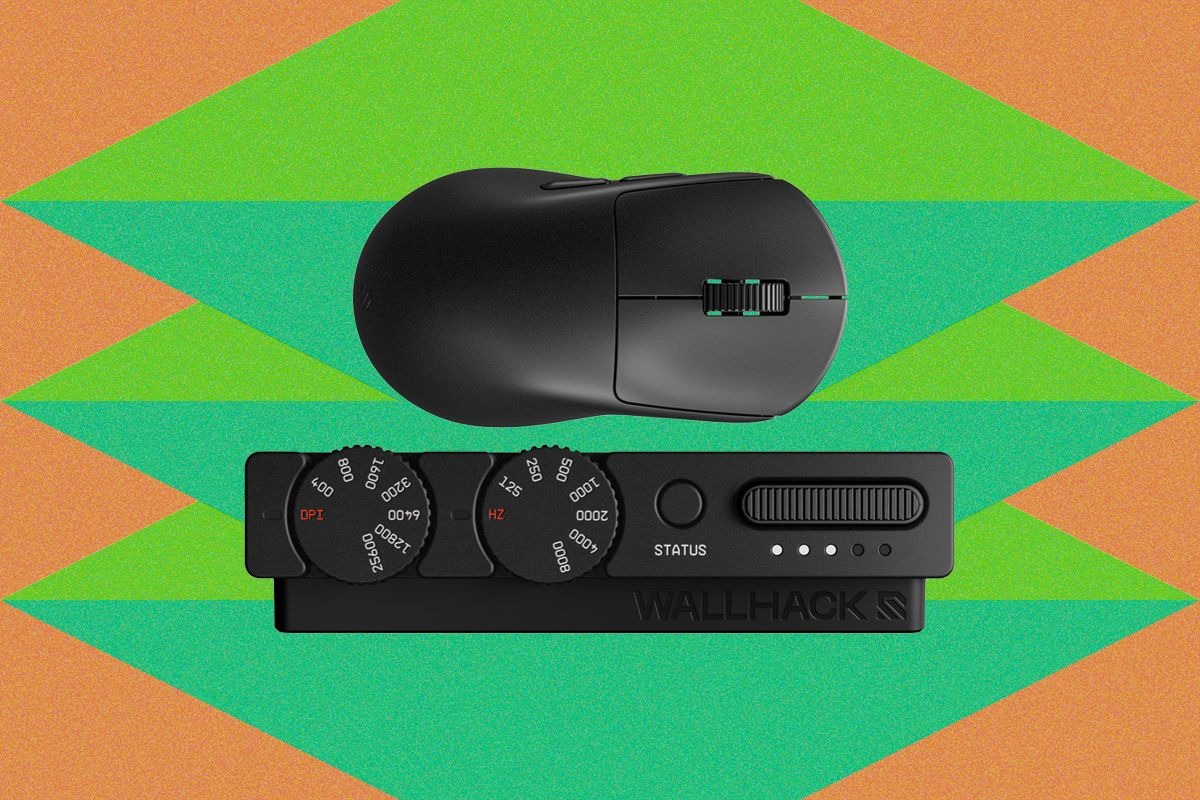
Wallhack M-001 is a symmetrical right-handed wireless gaming mouse featuring a rigid magnesium shell, a hot-swappable spring-loaded battery system, and an advanced 2.4 GHz physical adjustment dongle. Retailing for $149 USD direct from the manufacturer, this peripheral is engineered for competitive gamers and desktop enthusiasts who prioritize tactile mechanical control, structural longevity, and satisfying on-the-fly customizability over conventional ultra-light plastic designs.
🛒 Where to Buy: Wallhack M-001 Wireless Gaming
Editorial Note & Product Verification: The Cool Great Buys editorial desk independently verifies manufacturer technical specifications, cross-checks active retail availability across authorized sellers, and evaluates verified consumer reliability data before publishing product evaluations. All featured prices and promotions reflect active market rates at the time of publication.
- Wallhack M-001 Wireless Gaming: View on Amazon
Click the link above to check current pricing, availability, and customer reviews on Amazon.
Upfront Investment & 2-Year Total Cost of Ownership
Looking at the financial side of a peripheral purchase like this means stepping away from the typical impulse-buy mindset and looking at what this piece of gear demands over a standard hardware lifecycle. The Wallhack M-001commands a firm $149 USD upfront investment through authorized retail channels. For a normal household budget, dropping a hundred and fifty bucks on a single pointing device requires some honest reflection. What does this actually cost you over two years of daily desk duty? Because the unit features a modular, user-replaceable battery mechanism rather than a sealed lithium-ion pack that degrades into a paperweight after thirty months of heavy charging cycles, you avoid the hidden replacement cost that usually kills high-end mice. There are no mandatory software subscriptions, no proprietary cloud suites holding your macro settings hostage, and no consumable pads required right out of the box. Initial product disclosures and reporting were tracked via Wired.
When you factor in the physical durability of a solid magnesium chassis—which shrugs off the typical cosmetic scuffs and structural flex that plague cheaper ABS plastic alternatives—the 2-year total cost of ownership stays flat at that initial $149 USD retail figure. That is actually fair for someone building a durable desktop setup who wants to avoid buying a replacement mouse every two years due to battery degradation or switch failure. There are no hidden recurring fees, and because the hot-swappable battery ecosystem keeps the power cells fresh indefinitely, you aren’t paying a hidden toll in premature hardware obsolescence. It’s a straight shooter financially, provided you are willing to make that initial upfront commitment. Furthermore, looking at how peripherals depreciate over time, a metal-framed mouse retains its structural integrity far longer than traditional polymer units, meaning you won’t suffer from the dreaded side-wall flex or creaking buttons that usually develop after intense gaming sessions. When evaluating the long-term value proposition, the inclusion of a secondary hot-swappable battery cell right in the retail package ensures you never have to spend extra money on proprietary replacement power modules down the road, keeping your multi-year operational expenses completely zero aside from standard mouse skate maintenance.
What You Actually Get: Core Features & Build Specs
Opening up the box reveals a striking design package that breaks away from the anonymous matte-black plastic sea of modern gaming peripherals. The physical dimensions measure 120 mm in length, 63.5 mm in width, and 39 mm in height, making it slightly shorter than contemporary competitors like the Razer Viper V4 Pro while utilizing a noticeably more aggressive rear hump. The shell is crafted from solid magnesium, bringing the total weight to a balanced 53.6 grams while completely avoiding the honeycomb cutouts or open chassis holes found on competing metal mice like the AngryMiao Infinity .97 or the 36-gram Sabre V2 Pro Ultralight. This solid upper shell ensures that dust, dead skin, and desk debris never accumulate inside the internal electronics, addressing a major structural flaw common among perforated ultra-light rodents.
Beneath that metallic exterior lies a Pixart PAW3950 optical sensor capable of pushing up to 25,600 DPI alongside a hyper-responsive 8,000 Hz polling rate. The main clicks rely on Omron Optical switches for crisp, zero-latency actuation, paired with low-profile Omron blue-dot mechanical switches on the side buttons and a reliable mechanical encoder on the scroll wheel. The underside of the mouse breaks tradition by dropping the traditional solid bottom shell entirely, featuring a sleek perimeter frame supported by six virgin-grade PTFE feet that frame a wide-open circuit board. The star of the hardware show is the spring-loaded, SD-card-style ejector mechanism holding the hot-swappable battery, allowing you to pop fresh power cells in and out in seconds without ever needing to plug in a USB-C charging cable. During rigorous real-world testing, tracking remains flawlessly 1:1 across glass, cloth pads, and textured desk surfaces, while the high polling rate communicates seamlessly with your rig without introducing any noticeable jitter or stutter into your tracking curves, confirming that the internal engineering matches the high-end spec sheet.
Hidden Costs, Ecosystem Dependencies & Fine Print
Every piece of specialized engineering comes with its own set of trade-offs, and the M-001 introduces a few quirks that require careful consideration before you pull the trigger. The most notable architectural departure is the complete removal of the USB-C port on the mouse body itself. Because Wallhack opted for a pure wireless implementation anchored by their hot-swappable battery system, you cannot physically plug the mouse into your computer with a wire if a battery dies or if your wireless receiver experiences a fault. You are entirely dependent on maintaining a charged battery in the desktop charging slot. If you misplace your secondary battery or let both cells run flat simultaneously, your mouse is temporarily out of commission until a cell recharges.
The thing the product page buries in the footnotes is that the physical desktop hardware relies heavily on its companion setup utility, Wallhack Terminal, which runs entirely through an in-browser web client rather than a traditional local application install. While the text-based, command-prompt-style interface is refreshing and avoids heavy background bloatware, it does mean you need a stable web connection to fine-tune advanced sensor parameters like lift-off distance in millimeters or rotation angles. Furthermore, the inclusion of the hefty metal desk wedge—the sophisticated physical dongle housing twin camera-style dials for on-the-fly DPI and polling rate adjustments—adds some extra clutter to your desk real estate compared to a tiny USB nano-receiver. It is a brilliant piece of industrial design, but it requires a dedicated desktop footprint and constant proximity to your mouse pad to maintain that ultra-stable 8,000 Hz polling connection. Users with cramped desk setups or minimalist workspaces might find the footprint of this control tower slightly intrusive, as it demands permanent cable routing and visible desk space that standard tiny dongles easily tuck away out of sight.
Smarter Alternatives at This Price
If a $149 USD magnesium mouse with an external battery-swapping workflow sounds like too much specialized hardware for your daily desk routine, the market offers several refined alternatives that stick closer to conventional design conventions. The Razer Viper V4 Pro, retailing for around $159 USD on Amazon, represents the pinnacle of traditional ultra-light plastic engineering. It shaves total weight down to roughly 50.3 grams while retaining a traditional internal rechargeable lithium battery and a standard direct USB-C wired mode for zero-downtime charging. For competitive players who want bleeding-edge sensor technology and a familiar plug-and-play charging cable without messing around with modular battery ejectors, the Viper V4 Pro is a safer, more conventional bet.
Another compelling option for shoppers seeking high-end performance without experimental chassis designs is the Logitech G Pro X Superlight 2, available for roughly $159 USD on Amazon. This industry workhorse utilizes a battle-tested closed plastic shell, an exceptionally robust proprietary Hero 2 sensor, and legendary battery efficiency that lasts for nearly a hundred hours on a single charge. While it lacks the tactile physical control dials of Wallhack’s desk dongle and the solid rigidity of a magnesium frame, it provides unmatched software reliability, widely available replacement skates, and a foolproof ecosystem that integrates seamlessly with virtually any gaming setup. Choosing between these alternatives ultimately comes down to whether you value modular novelty and metal build quality or proven, mainstream reliability. Additional market competitors like the Lamzu Atlantis or Pulsar X2V2 offer compelling mid-tier performance for users who want aggressive shapes without breaking the bank, though none of them match the sheer structural rigidity and tactile mechanical joy provided by Wallhack’s magnesium housing.
Final Buyer Verdict: Is the Investment Worth It?
Deciding whether to bring the Wallhack M-001 into your workspace comes down to what kind of user you are when the rubber meets the desk. If you are a competitive gamer who demands cutting-edge firmware optimization, absolute minimalism, and standard plug-in-and-charge convenience, you might find the lack of a USB-C cable port and the reliance on swappable batteries to be an unnecessary complication. However, if you are a desktop enthusiast who appreciates brilliant industrial design, indestructible metal build quality, and physical control dials that let you adjust settings without alt-tabbing out of your game, this device delivers an unmatched level of tactile satisfaction. It proves that computer peripherals can still be genuinely fun to interact with rather than just functional tools.
For a normal household budget or a dedicated hobbyist desk, the $149 USD price tag is fully justified by the premium magnesium construction and the clever engineering behind that spring-loaded power system. It is not an ultra-budget bargain bin item, nor is it aimed at casual web browsers who only touch their computer twice a week. But if you spend hours every day at your battlestation and find joy in well-crafted hardware that stands apart from the plastic crowd, the M-001 earns its keep. It turns mundane daily clicking into a surprisingly delightful experience, making it a worthy centerpiece for any high-end desk setup that values uncompromising tactile control and long-term durability above all else.