

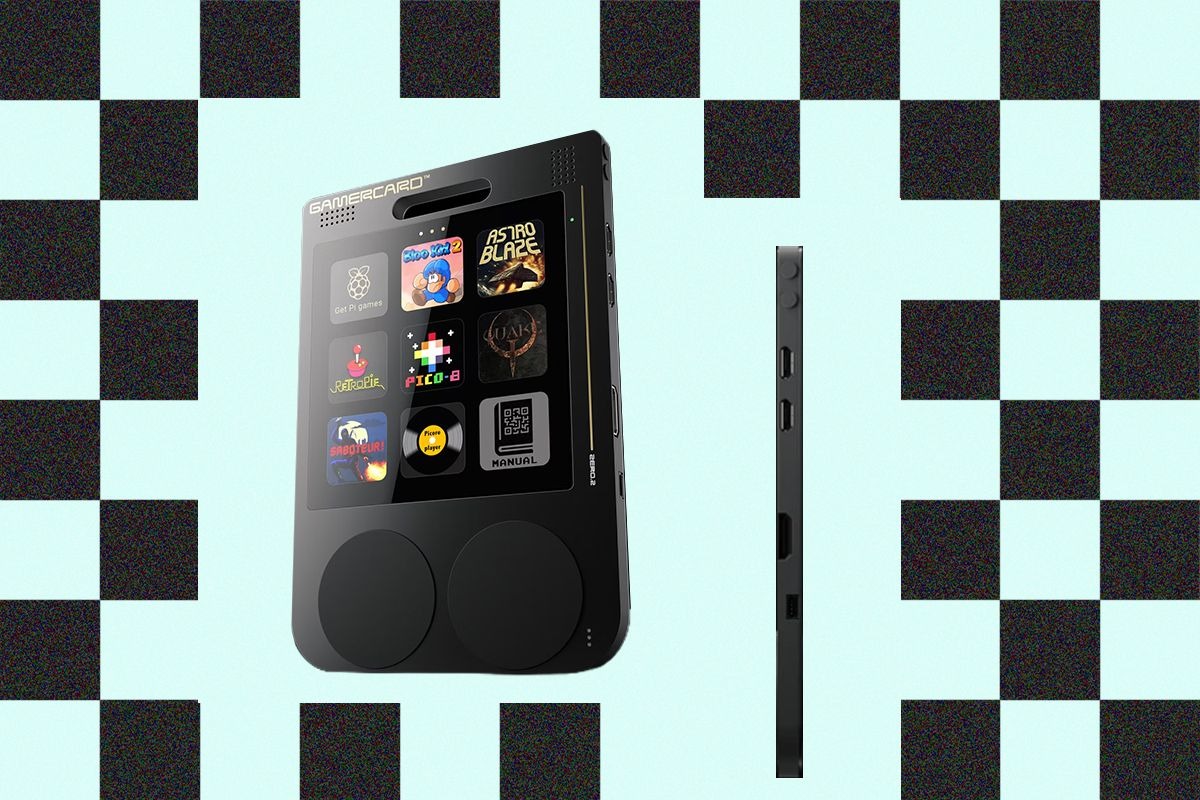
The GamerCard is an ultra-slim pocket-sized retro gaming device built on an adapted Raspberry Pi Zero 2W motherboard, integrating a quad-core ARM Cortex-A53 processor, a 4-inch 720p IPS display in a 1:1 square aspect ratio, and a 1,600-mAh battery directly into a 128 x 88 x 6.5-millimeter enclosure weighing 100 grams. Retailing for £99 GBP ($130 USD) through authorized channels, this device is explicitly designed for impulse retail shoppers seeking an accessible, credit-card-sized portable console alongside hobbyist power users interested in programming and retro emulation. Beneath its deceivingly simple exterior lies a complex interplay of engineering constraints, aesthetic ambition, and software compromises that demand close examination from anyone considering bringing it into their daily carry rotation.
🛒 Where to Buy: GamerCard
Editorial Note & Product Verification: The Cool Great Buys editorial desk independently verifies manufacturer technical specifications, cross-checks active retail availability across authorized sellers, and evaluates verified consumer reliability data before publishing product evaluations. All featured prices and promotions reflect active market rates at the time of publication.
- GamerCard: View on Amazon
Click the link above to check current pricing, availability, and customer reviews on Amazon.
Historically speaking, the consumer electronics market has seen repeated attempts to miniaturize general-purpose computing platforms into pocket-ready form factors, often sacrificing ergonomic comfort in the pursuit of absolute physical portability. Examining recent market pricing trends across component manufacturing, as noted in broader industry reporting on memory and silicon pricing, finding a versatile programmable handheld at this price point feels like a minor miracle. Yet, translating raw engineering ambition into a cohesive consumer experience requires more than minimalist aesthetics and compact dimensions. Initial product disclosures and reporting were tracked via Wired, highlighting the ongoing tension between ultra-thin hardware design and practical, everyday usability.
When users first slide the unit out of its retail packaging, the immediate visual impression is striking. Measuring only 6.5 millimeters thick, it genuinely slips into a coin pocket or a tightly tailored wallet slot with room to spare. This engineering feat is accomplished by stripping away standard peripheral ports and mounting custom silicon directly onto a specialized micro-PCB layout. However, this minimalist approach leaves little room for error. The exterior shell is constructed from a hard matte polymer that resists fingerprint accumulation but feels uncomfortably rigid during intensive gaming sessions where hands naturally clamp down on the edges. The balance point of the unit is centered remarkably well, ensuring that despite its featherlight 100-gram mass, it never feels top-heavy or awkward to hold, though the lack of any rubberized side grips means it can easily slip from sweaty palms during frantic boss battles.
Real-World Context and Target Buyer Profile
Positioned intriguingly between impulse-buy items often displayed near retail checkout counters and open-ended developer boards, the GamerCardattempts a dual identity. For the casual consumer browsing retail displays, the appeal lies in an immediately playable, pocket-portable gadget loaded with minimalist indie titles such as Bloo Kid 2 and Astro Blaze. At the same time, the inclusion of a Qwiic connector, a Linux terminal emulator, and native programmability in MicroPython, C, C++, and Basic targets a distinct demographic of hardware tinkerers and retro-gaming enthusiasts accustomed to configuring custom Linux distributions. This duality creates a fascinating paradox: the marketing materials lean heavily toward nostalgic gaming accessibility, while the actual internal architecture whispers promises of embedded systems programming and hardware modification.
In practice, however, bridging the gap between a casual plug-and-play appliance and an open developer kit presents inherent friction. A casual consumer drawn to an unpretentious gaming card is rarely prepared to navigate an FTP client to transfer retro game files, nor do they typically possess the patience to decode inconsistent, unmarked control schemas. Conversely, advanced users accustomed to raw single-board computers may find the physical limitations of an ultra-slim, uncooled layout frustrating when compared to dedicated modular retro consoles. The distinction matters here: treating this device purely as a consumer arcade machine overlooks its educational underpinnings, while evaluating it solely as an engineering kit ignores its retail positioning. Field testing reveals that while tech-savvy hobbyists will happily spend an evening tweaking configuration files and compiling custom emulation frontends, the average retail buyer may find themselves overwhelmed by the sheer amount of manual setup required to curate a functional game library.
Furthermore, the target audience must contend with the realities of using a pocket-sized Linux machine in public spaces. Commuters looking for a quick distraction on a crowded train will find that the lack of physical volume buttons makes adjusting audio output mid-ride an exercise in frustration, requiring navigation through nested software menus while audio blares unexpectedly. Similarly, the absence of a traditional headphone jack forces reliance on Bluetooth audio, introducing noticeable audio lag that completely ruins rhythm games and action titles. These friction points demonstrate that the hardware struggles to decide whether it wants to be a casual commuter gadget or a serious hobbyist toolkit, ultimately landing in a niche territory that demands patience, technical literacy, and a willingness to forgive design oversights.
Hardware Engineering, Materials, and Core Specs
According to technical documentation published with this release, the physical chassis is remarkably sparse, measuring a mere 6.5 millimeters in thickness and tipping the scales at 100 grams. The interior houses a quad-core ARM Cortex-A53 processor paired with onboard storage and a 1,600-mAh rechargeable battery engineered to deliver approximately four hours of active runtime. Connectivity options are surprisingly comprehensive given the physical envelope, featuring a single USB-C port, two Micro-USB ports, a mini HDMI output for external display hookups, a microSD card slot positioned along the top edge, and a Qwiic interface on the right flank alongside miniature Start and Select buttons. This hardware configuration provides a surprising amount of computational headroom for running classic 8-bit and 16-bit emulation cores, while easily handling native Linux applications and lightweight development environments.
The engineering trade-offs of such an aggressive physical profile become immediately apparent upon extended operation. Because the structural casing is effectively a wafer-thin skin stretched directly over the motherboard, thermal dissipation is handled by the chassis itself, resulting in a noticeably warm grip during prolonged gaming sessions. While temperatures never reach uncomfortable or hazardous levels, feeling the underlying circuitry through the plastic is an unusual tactile experience that reminds users of the dense silicon packed inside. Furthermore, physical access to internal storage requires navigating a tight microSD slot lacking a push-to-eject mechanism, a mechanical oversight that demands careful extraction using external tools during manual file transfers. If you swap microSD cards frequently to test different operating system builds or game libraries, this omission quickly transforms into a tedious chore.
Looking closer at the display assembly, the 4-inch 720p IPS screen boasting a 1:1 square aspect ratio is undeniably the star of the hardware show. Colors burst forth with exceptional vibrancy, deep contrast levels, and wide viewing angles that make classic pixel art pop with authentic retro charm. The square layout naturally accommodates classic computer systems like the Game Boy, Game Boy Color, and Pico-8 titles without requiring awkward letterboxing or scaling distortion. However, running older widescreen console titles or arcade roms forces aggressive pillarboxing, which shrinks the usable active display area significantly. Despite this limitation, the sheer pixel density and brightness of the panel elevate the visual experience far above what one would expect from a budget-tier hobbyist board, ensuring that retro game graphics look crisp and saturated even under bright ambient lighting conditions.
Everyday Usability & Design Compromises
Day-to-day operation reveals significant ergonomic and interface hurdles that impact overall utility. Control inputs rely on four discrete silicone-covered pads on each side of the front face rather than traditional mechanical D-pads or joysticks. While the right side functions adequately for individual action buttons mapped in a standard diamond formation, the left side lacks a unified directional rocker, transforming movement in platform and action titles into a laborious sequence of manual presses. Input latency further dampens responsiveness, making fast-paced arcade action or precise aiming in 3D titles like the shareware port of Quake exceedingly difficult. Executing complex diagonal movements in fighting games becomes an exercise in frustration, as the isolated silicone nubs fail to provide the tactile pivot point that traditional directional pads offer.
Software navigation compounds these hardware constraints due to omission and ambiguity. The interface operates on a clean 3×3 grid tailored to the 720p square display, yet the hardware completely lacks a dedicated Home button to suspend titles or return to the system menu. Exiting a running application requires a persistent Start and Select button combination that functions inconsistently across loaded software, occasionally forcing a complete system restart through a 35-second boot cycle. Audio management suffers from a similar lack of physical volume toggles and the total absence of a 3.5-millimeter headphone jack, relying instead on erratic Bluetooth pairing routines that frequently fail to recognize standard wireless listening peripherals. When Bluetooth audio does connect, minor synchronization delays can ruin immersion in titles where sound effects provide crucial gameplay cues.
Battery performance during everyday use largely aligns with manufacturer estimates, yielding roughly three and a half to four hours of continuous play when screen brightness is set to a moderate level and Wi-Fi modules are disabled. However, pushing the processor with heavier emulation cores or compiling code locally drains the 1,600-mAh cell significantly faster, dropping active runtime closer to the two-hour mark. Recharging the unit via the primary USB-C port takes approximately 90 minutes from empty to full. It is worth noting that charging while playing causes the rear chassis to heat up noticeably faster due to the combined thermal output of the internal battery charging circuit and the uncooled ARM processor, which can make extended couch gaming sessions slightly uncomfortable on the palms.
Category Alternatives and Value Comparison
When evaluating portable retro gaming hardware in the sub-$150 price bracket, consumers typically weigh dedicated turnkey emulation systems against open-source hobbyist devices. Established alternatives such as the Retroid Pocket 4 — offer dedicated game controls, active cooling fans, dual analog thumbsticks, and mature operating systems designed explicitly for seamless emulation without requiring network file transfers or terminal commands. These conventional handhelds prioritize ergonomic comfort and out-of-the-box software polish, making them significantly more forgiving for users seeking a frictionless retro gaming experience during travel or daily commutes. They also handle demanding PlayStation 2 and GameCube emulation with ease, a feat that is entirely beyond the computational reach of a Raspberry Pi Zero 2W motherboard.
Alternatively, enthusiasts drawn specifically to the ecosystem flexibility of Raspberry Pi architectures often look toward modular DIY kits or handheld shells from specialized vendors like ClockworkPi GameShell — which provide modular assembly, physical directional pads, and accessible storage compartments designed for modification. While these modular competitors lack the impossibly thin credit-card profile of the GamerCard, they avoid the thermal warming, unresponsive silicone pads, and frustrating storage access issues that plague ultra-slim engineering compromises. For buyers unwilling to wrestle with command-line file protocols and inconsistent button mappings, traditional handhelds provide superior long-term reliability and comfort, whereas modular competitors offer a much more satisfying hardware assembly and modification experience for DIY hobbyists.
Comparing price-to-performance ratios across these alternatives highlights the unique market position of this Raspberry Pi-powered handheld. At £99 GBP ($130 USD), it undercuts bulkier modular kits while offering a sleeker form factor than almost any competitor on the market. Yet, that financial savings comes at a severe cost in ergonomic playability and user-friendliness. Buyers purchasing purely for gaming utility will find that spending twenty dollars more on a dedicated turnkey console yields a vastly superior software ecosystem, mechanical controls, and battery life. Conversely, programmers and makers who view the hardware as an educational development platform with bonus gaming capabilities will appreciate the value of having a fully functional Linux computer packed into a credit-card-sized enclosure that fits effortlessly into a shirt pocket.
Final Buyer Verdict: Long-Term Ownership Value
Analyzing the complete hardware package reveals a device defined by unrealized potential rather than immediate consumer polish. For specialized educators, embedded programmers, and dedicated Raspberry Pi kitbashers willing to write MicroPython scripts or experiment with the Pico-8 game development engine, the device offers a fascinating, highly portable Linux playground. The bright 60-frames-per-second square IPS screen renders classic pixel art with impressive vibrancy, proving that the underlying display technology and core processing concept possess genuine merit when paired with the right software environment. The ability to interface with external hardware via the Qwiic connector opens up creative prototyping possibilities that no standard gaming handheld can match, turning a simple retro console into a portable development hub for physical computing projects.
For the general consumer, however, the current iteration remains difficult to recommend due to stiff controls, missing physical navigation keys, and cumbersome ROM management protocols. Until a revised hardware iteration addresses tactile responsiveness, incorporates physical volume and home controls, and standardizes button recognition across native and emulated titles, this initial release occupies an awkward middle ground. Those seeking a reliable, ready-to-play portable gaming companion should look toward established turnkey alternatives, reserving this pocket-sized experiment for dedicated enthusiasts eager to tinker with its underlying code. Ultimately, this Raspberry Pi handheld stands as a bold, uncompromising experiment in miniaturization—one that brilliantly succeeds as a programmable engineering novelty while stumbling as an everyday consumer gaming device.