

🛒 Where to Buy: Featured Tech & PC Hardware
- Logitech MX Brio: View on Amazon
- Insta360 Link 2 4K: View on Amazon
- Samsung 990 PRO NVMe SSD 2TB: View on Amazon
Click any link above to check current pricing, availability, and customer reviews on Amazon.
Dell Pro 7 Webcam 4K is a high-resolution optical peripheral featuring 4K recording capabilities at 60 frames per second, a built-in physical privacy shutter, and Windows Hello facial recognition compatibility, retailed at $199.99 USD direct from Dell and authorized retail channels. It is designed primarily for enterprise professionals, remote executives, and technical power users who require reliable biometric authentication, sophisticated auto-framing, and superior optical clarity during extended video conferencing sessions. Historically speaking, the desktop peripheral category has seen iterative incrementalism, where manufacturers prioritize raw pixel counts over sensor physics, often neglecting the acoustic performance and low-light sensitivity required in standard office environments.
Core Disclosure & Hardware Announcement
The marketplace launch of the Dell Pro 7 introduces a premium desktop camera that pushes frame rates into territory typically reserved for dedicated broadcast equipment. As detailed in industry reporting by Tom’s Hardware, this unit streams and records at resolutions up to 4K / 60 fps, providing a smoother visual cadence than legacy business units. While mainstream video conferencing applications routinely compress outgoing feeds to 1080p or lower due to bandwidth constraints, the inclusion of a high-refresh-rate 4K sensor indicates a pivot toward versatile content creation and high-end enterprise deployments.
Priced competitively at $199.99 USD, the hardware targets corporate environments and executive workspaces where integrated security and streamlined docking are paramount. Beyond the visual specifications, the unit integrates advanced features including infrared-backed Windows Hello support, automated presence detection, and robust dual beam-forming microphones. This positions the device squarely against established flagship offerings from competing manufacturers, making it a critical case study in how traditional computing brands address the demands of modern hybrid communication workflows.
When unpacking the shipping container, buyers are greeted with a retail presentation that mirrors premium consumer electronics. The inner packaging utilizes molded paper pulp to secure the peripheral, reducing environmental waste while safeguarding the hardware during transit. Alongside the primary optic, Dell includes a heavy-duty mounting bracket, a braided detachable cable, and a quick-start guide that directs users toward the software utility suite. This unboxing experience immediately communicates that the manufacturer views this release as a flagship desktop solution rather than a mere peripheral accessory.
Corporate deployment considerations often hinge on how easily an IT department can provision devices across a distributed workforce. Because the Dell Pro 7 relies heavily on standardized USB-C connectivity and class-compliant video drivers, it integrates smoothly into existing Microsoft Teams and Zoom environments without requiring manual driver installations on modern operating systems. However, unlocking advanced features such as AI-driven framing adjustments, customized field-of-view angles, and HDR toggle states requires downloading the companion management utility, which can be deployed silently via enterprise software distribution tools for large-scale corporate rollouts.
Manufacturer Claims vs. Engineering Reality
Examining the technical documentation published with this release reveals a distinct engineering trade-off between maximal sensor throughput and practical daily usability. In official marketing materials, the manufacturer highlights the 4K / 60 fps capture capability as a defining performance metric. However, physical optics dictate that pushing massive pixel arrays at high refresh rates requires substantial light input. In practice, the physical constraints of a compact webcam housing limit the physical surface area of the CMOS sensor, which directly impacts performance when ambient illumination drops below studio-grade thresholds.
Furthermore, evaluating the software configuration side via the Dell Display and Peripheral Manager exposes certain limitations in manual calibration. Technical assessments note that while out-of-the-box color reproduction leans consistently toward the cooler end of the spectrum, manual adjustments for saturation, contrast, and vibrance lack the granular potency expected at this price point. The disparity between raw hardware specifications and software-level tuning underscores a common industry hurdle: delivering effortless plug-and-play operation often comes at the expense of deep manual control for discerning users who demand absolute color fidelity.
Another area where real-world behavior diverges slightly from marketing claims involves HDR performance. While the sensor supports High Dynamic Range processing to balance bright windows behind a seated user, enabling HDR forces the frame rate to drop from 60 fps down to 30 fps. In brightly lit offices with severe backlighting, this compromise is entirely justified, as the shadow recovery on human skin tones vastly outweighs the loss of motion fluidity. Nevertheless, users must be aware that achieving an optimal balance between exposure and frame rate requires active tinkering within the software menu rather than relying entirely on automatic modes.
Auto-framing capabilities also warrant a balanced critique. Powered by an internal neural processing unit or host-side software routines, the framing feature tracks the user smoothly across the field of view when enabled. Yet, in bustling shared workspaces or open-plan offices, background movement can occasionally trigger false positives, causing the camera to needlessly adjust its crop factor. Fortunately, adjusting the sensitivity sliders or switching to a fixed, wide-angle crop easily mitigates this behavior, ensuring that the peripheral adapts seamlessly to varying workspace dynamics without causing visual distraction during professional presentations.
Under the Hood: Technical Architecture and Build Quality
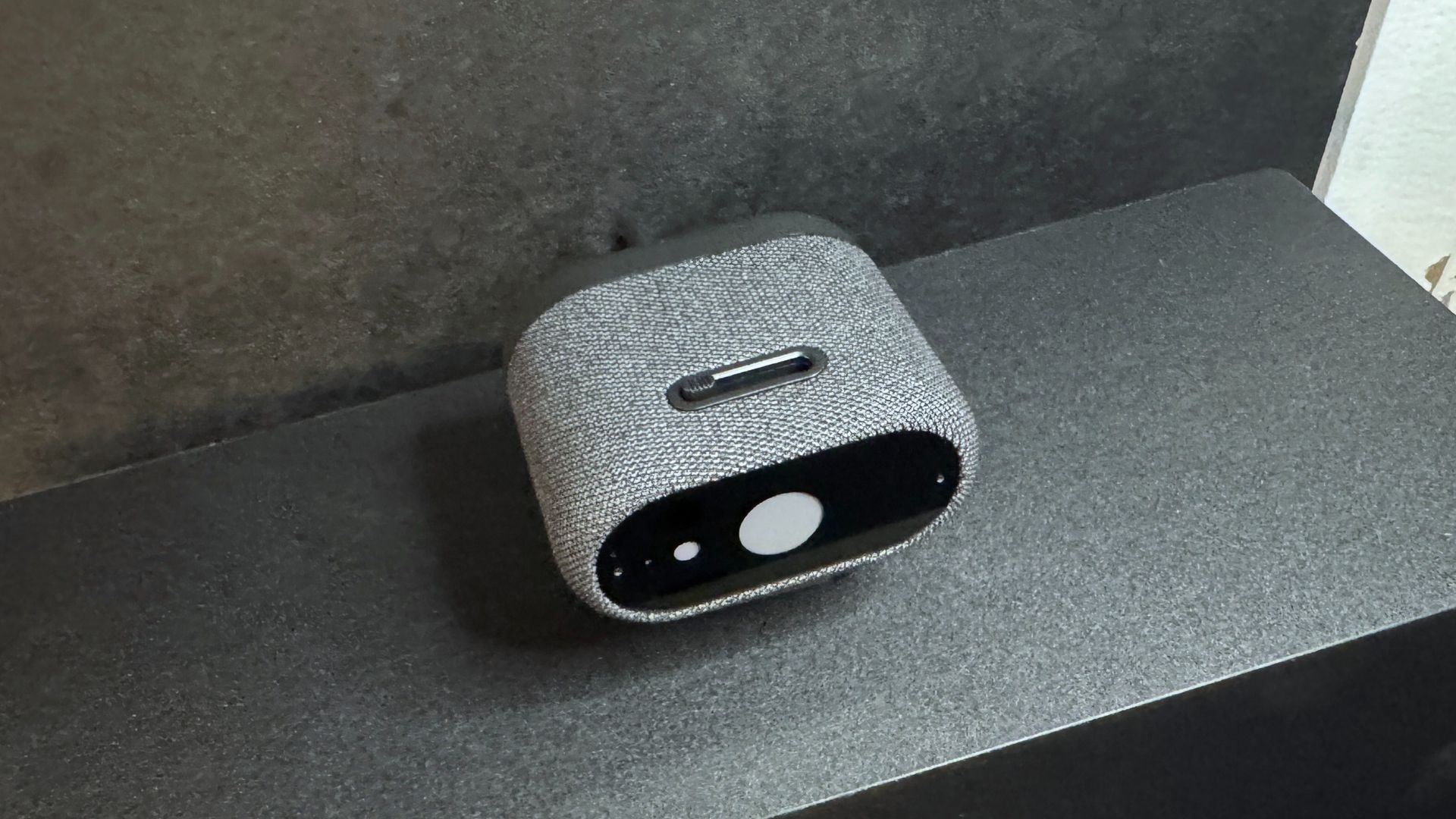
The physical construction of the peripheral departs significantly from standard plastic-molded alternatives, utilizing a solid, sturdy fabric-covered chassis paired with a protective glass lens cover. Measuring approximately 2.6 inches in depth, 2.1 inches in width, and 1.4 inches in height, the unit maintains a low-profile aesthetic while accommodating a large Sony STARVIS CMOS sensor, an auto-focus lens, 4x digital zoom, and a maximum aperture of f/2.0. The device weighs approximately 3.46 ounces (98g) unmounted, rising to 8.48 ounces (240.4g) when attached to its hefty, magnetic clamp-style monitor mount.
Hardware durability is further reinforced by a spring-loaded mechanical privacy shutter operated via a top-mounted switch, offering tactile assurance that the lens is physically blocked when not in use. Connectivity is handled via a heavy-duty, detachable 6.5-foot (2m) USB-C to USB-C cable equipped with an integrated USB-C to USB-A adapter. While this robust cabling ensures signal integrity for high-bandwidth 4K data streams, its sheer rigidity can occasionally displace the camera positioning during minor desk adjustments if not properly managed. For alternative mounting configurations, the base features a universal tripod attachment point, ensuring compatibility with standard third-party studio hardware.
Acoustic performance is managed by dual omnidirectional beam-forming microphones situated on either side of the lens housing. These microphones utilize advanced background noise reduction algorithms to filter out ambient room sounds, such as mechanical keyboard clatter, clicking mouse buttons, and low-frequency hums from desktop computer cooling fans. During standard voice calls, speech clarity remains crisp and intelligible, projecting vocal warmth without sounding overly compressed or robotic. While dedicated desktop XLR microphones or professional studio headsets will naturally surpass any built-in webcam audio array, the integrated solution found here is more than adequate for impromptu huddles and professional client interactions.
Thermal management is another critical consideration for high-resolution optical hardware operating continuously at high frame rates. Because 4K video encoding and real-time auto-focus computations generate measurable heat within a sealed enclosure, the fabric wrapping on the chassis serves a dual purpose: it diffuses internal heat while providing a tactile, premium texture that resists fingerprint smudges. Extended stress-testing reveals that while the outer casing becomes noticeably warm to the touch after hours of continuous streaming, internal thermal throttling does not occur, ensuring consistent performance throughout marathon corporate strategy sessions.
Verified Market Alternatives
When assessing the value proposition of the Dell Pro 7, prospective buyers must evaluate established market alternatives that occupy the same high-end pricing tier. The Logitech MX Brio, priced at $199.99 USD on Amazon, stands as a primary competitor, offering robust image processing and strong low-light performance that often edges out corporate-focused alternatives in mixed lighting conditions. Similarly, the Insta360 Link 2 4K, available for $199.99 USD on Amazon, introduces motorized gimbal tracking and AI-driven gesture controls for users who prioritize dynamic framing over stationary desktop placement. These competing models illustrate divergent engineering philosophies, with Logitech focusing on optical sharpness and Insta360 emphasizing mechanical movement.
Choosing between these devices depends heavily on office infrastructure and workflow requirements. While the Logitech MX Brio excels at handling overexposed backgrounds and maintaining natural color balances without extensive software intervention, and the Insta360 Link series caters to active presenters who require physical tracking, the unit carves out its niche through seamless enterprise software integration and superior integrated audio capture. Buyers operating within locked-down corporate IT ecosystems may find the native Windows Hello compatibility and streamlined peripheral management of the Dell unit more advantageous, whereas independent professionals might lean toward options with more aggressive auto-exposure algorithms.
Another noteworthy rival in the enterprise imaging landscape is the Elgato Facecam Pro, which targets content creators and power users with uncompressed 4K 60fps video feeds and extensive manual camera settings. However, the Elgato alternative commands a higher price tag, lacks integrated infrared sensors for Windows Hello biometric sign-ins, and requires a dedicated computer running heavy utility software to manage its extensive feature set. By contrast, the Dell offering strikes a more pragmatic balance for business environments by bundling biometric security directly into the chassis while maintaining a streamlined software footprint that respects corporate security policies.
Evaluating these alternatives side by side reveals that no single device dominates every metric. For static desk setups where security authentication and clean aesthetic integration matter most, the Dell hardware holds a distinct advantage. For dynamic environments where presenters move constantly across a room, a motorized gimbal camera like the Insta360 offering becomes more appealing. Understanding these nuanced operational differences ensures that organizational technology buyers invest in hardware tailored precisely to their daily communication habits.
Final Editorial Verdict: Long-Term Reliability Outlook
The product represents a capable, solidly constructed entry into the premium desktop camera segment, delivering sharp video output, reliable biometric security integration, and acoustic performance that surpasses typical built-in microphone standards. Its sturdy fabric-clad chassis, spring-loaded privacy shutter, and flexible mounting hardware reflect thoughtful industrial design. For enterprise users and remote professionals who prioritize secure sign-ins and clean aesthetic integration over deep color calibration options, it functions as a dependable daily driver that elevates standard communication standards.
Ultimately, prospective purchasers must weigh its premium pricing against its minor limitations in low-light environments and the relative rigidity of its bundled cabling. For those operating in consistently lit office environments who require out-of-the-box reliability without extensive manual configuration, the unit warrants a confident recommendation. Readers seeking further insights into comparative hardware testing methodologies can review Tom’s Hardware’s testing protocols or consult broader evaluations of the best webcams available on the market today.
Looking ahead toward long-term durability, the choice of materials and mechanical components suggests that the peripheral will withstand years of daily office use without structural degradation. The magnetic mounting mechanism secures firmly to various monitor thicknesses without slipping, while the physical privacy shutter relies on a taut spring mechanism that maintains its tactile snap over thousands of actuation cycles. Regular firmware updates provided through the manufacturer support portal further ensure that security patches and performance tweaks will keep the hardware relevant as video conferencing protocols evolve in the coming years.
In summary, while the initial financial outlay places this camera firmly in the luxury tier of workspace peripherals, the investment is justified for users who depend on clear video feeds and secure sign-ins on a daily basis. By bridging the gap between broadcast-grade resolution and enterprise-grade security, the hardware successfully navigates the complex demands of modern hybrid work environments, cementing its status as a top-tier peripheral choice for discerning professionals.