

Real-World Context and Target Buyer Profile
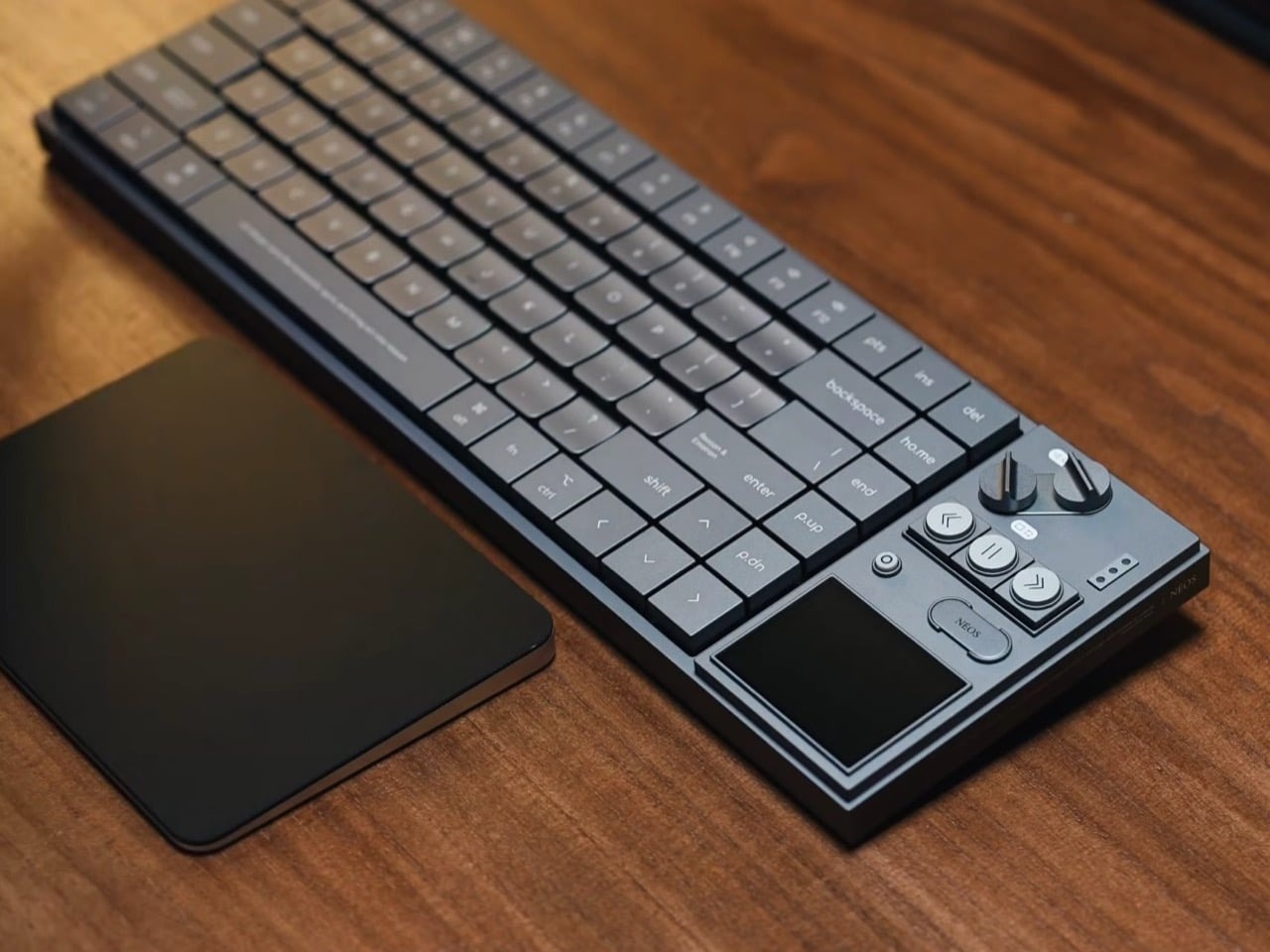
The AULA Neos 75 is a 75-percent low-profile mechanical keyboard featuring a single-piece CNC aluminum body, full aluminum keycaps, and a dedicated retro hi-fi control deck mounted on the right side of the chassis. The keyboard opened preorders in China at an introductory price of $180 USD (converted from ¥1,299.1), with an official retail list price of $225 USD (converted from ¥1,599.1) directly on AULA’s regional store ahead of an upcoming global release. The peripheral is built specifically for mechanical keyboard enthusiasts, desk setup collectors, and audio gear fans who want tactile hardware dials, media buttons, and a customizable color display integrated directly into their desktop typing deck.
🛒 Where to Buy: AULA Neos 75 Mechanical
Editorial Note & Product Verification: The Cool Great Buys editorial desk independently verifies manufacturer technical specifications, cross-checks active retail availability across authorized sellers, and evaluates verified consumer reliability data before publishing product evaluations. All featured prices and promotions reflect active market rates at the time of publication.
- AULA Neos 75 Mechanical: View on Amazon
Click the link above to check current pricing, availability, and customer reviews on Amazon.
This release represents a dramatic pivot for manufacturer AULA. Historically, the brand built its market footprint by mass-producing budget plastic gaming keyboards drenched in rainbow lighting for under $40 USD on Amazon. The Neos 75 originates from a new internal design group called AULA.New Renaissance. This specialized team stripped away cheap plastic housings, glowing logo badges, and standard keycap profiles. In their place, they engineered a heavy industrial metal casing that draws heavy aesthetic inspiration from mid-century hi-fi audio equipment and modern boutique music synthesizers. Initial product disclosures and reporting were tracked via Yankodesign.
In real-world terms, standard 75-percent low-profile keyboards prioritize space savings and extreme portability for mobile workers. The Neos 75 intentionally breaks that mold. By bolting an analog-style media control block to the right edge of the frame, AULA creates a wide, heavy desktop centerpiece rather than a lightweight travel accessory. Buyers eyeing this board are paying for physical craftsmanship, unique metal keycaps, and tactile control knobs rather than raw minimalist efficiency.
Hardware Engineering, Materials, and Core Specs
The core chassis of the Neos 75 is CNC-machined from a single solid block of aluminum, creating a rigid structure that resists deck flex under heavy typing pressure. The physical footprint measures 14.7 × 4.8 × 1.2 inches (372.8 × 122.3 × 29.65mm), making it notably wider than traditional 84-key layouts due to the added control module. AULA offers the keyboard in four color finishes named after mythological figures: Venus anodized silver, Hades anodized black, Selene anodized gray, and Athena, which features a smooth electrophoretic white coating. Matching aluminum keycaps come standard across all variants, sculpted with flat exterior borders and a gentle concave dip in the center to cradle finger pads during rapid keystrokes.
The centerpiece of the board sits on the right-hand side panel. A 2.3-inch color LCD screen running at 480 × 360 pixel resolution displays real-time hardware status, system clock data, battery levels, or custom user graphics. Directly above the screen sit two slotted metal knobs designed to resemble oversized screw heads. The upper knob features internal rotational damping for master system volume adjustments and pressing to mute, complete with a removable top cap. The lower knob navigates screen menus, flips UI pages, and activates an integrated hardware calculator mode. Beneath the knobs lie three round metal media buttons for track rewind, play/pause, and fast-forward, alongside a pill-shaped NÉOS system key and a small function button.
The visual language of this media block borrows heavily from 1950s Braun audio gear designed by Dieter Rams, as well as contemporary boutique instruments like the OP-1 Field synth and the all-black OP-XY. The typing plate relies on a flexible gasket mount structure. To shape the board’s sound profile, AULA packs the internal cavity with multiple acoustic layers, including PORON dampening foam, an IXPE switch pad, and a PET isolation sheet designed to eliminate metallic pinging. The board houses custom low-profile switches developed with Kailh, mounted in hot-swappable sockets to support linear and tactile stem configurations. Power flows from an internal 4,200mAh battery cell housed in its own isolated compartment, supporting tri-mode connectivity across USB-C wired mode, 2.4GHz wireless, and Bluetooth.
According to technical documentation published with this release, AULA claims that the Neos 75 engineering manifesto “puts the keyboard back in human hands five centuries after the Renaissance” by prioritizing human-centric physical controls over software submenus. Analyzing the official spec sheet against real-world hardware data reveals how that claim translates on paper versus in practice. While the inclusion of lower-case keycap legends like “ho.me” and “p.up” along with “Reason & Emotion” text printed on the Enter key adds quirky visual personality, the physical reality comes down to spring weight and component mass. Aluminum keycaps weigh significantly more than standard PBT keycaps. Combining heavy metal keycaps with low-profile Kailh switches requires precise spring force engineering to ensure prompt key return and avoid a sluggish, muddy typing feel over long writing sessions.
Everyday Usability & Design Compromises
Living with the Neos 75 on a daily basis highlights clear trade-offs between aesthetic ambition and desktop ergonomics. The primary compromise stems from physical dimensions. At 14.7 inches long, the extra side console pushes the overall board width closer to a full-sized tenkeyless keyboard. For right-handed gamers who rely on low mouse DPI settings, that extra inch and a half of right-side metal reduces mouse sweep area. The board weighs considerably more than standard plastic or tray-mount aluminum peripherals, anchoring it firmly to a desk mat but making it completely impractical to throw into a daily commute backpack.
The aluminum keycaps present their own set of practical realities. On paper, all-metal keycaps sound like the ultimate premium material choice. In real-world desk use, metal caps transfer ambient room temperature immediately. On cold morning desk sessions, the keys feel icy to the touch until your hands warm them up. While the electrophoretic and anodized surfaces resist oil buildup far better than glossy ABS plastic, metal keycaps produce a distinctly higher-pitched acoustic click when bottoming out against the plate. The internal sound stack—comprising PORON foam and the IXPE pad—does heavy lifting to keep bottom-out sounds from echoing inside the CNC chamber, but the acoustic profile remains sharper than traditional thick PBT keycaps on a full-height board.
Software and screen control represent another area where hardware enthusiasm meets real-world software friction. The 2.3-inch color display looks sharp with its 480 × 360 pixel density, but its day-to-day utility depends entirely on software stability. Customizing screen artwork, button assignments, and knob behavior requires using AULA’s A HUB 3.0 software package or web-based VIA mapping tools. While VIA offers stable key remapping on Windows and macOS, proprietary driver software from peripheral makers routinely struggles with background system resource usage and erratic sync updates. Furthermore, keeping a color LCD active alongside wireless transmission pulls constant energy from the 4,200mAh battery. Running the screen at maximum brightness will require frequent USB-C recharging cycles compared to non-screen low-profile boards that last for weeks on a single charge.
Typing ergonomics on low-profile switches are inherently different from standard mechanical switches. Key travel distance is compressed, meaning fingers bottom out faster. AULA includes fold-out aluminum feet on the underside of the CNC frame to adjust the typing angle, which helps alleviate wrist strain during extended typing blocks. The custom Kailh switches provide clean stem stability with minimal wobble, but users switching from deep-travel desktop boards will experience a learning curve when adjusting to the shallow actuation depth of low-profile stems topped with heavy metal caps.
Category Alternatives and Value Comparison
To evaluate whether the Neos 75 delivers long-term hardware value at its $180 USD to $225 USD price range, it must be measured directly against established market leaders in the low-profile mechanical keyboard space. The low-profile market has expanded rapidly, but few competitors attempt to blend industrial metal keycaps, hi-fi analog dials, and integrated color screens into a single chassis.
The primary benchmark in this category is the NuPhy Air75 V2— $119.99 USD on Amazon. The Air75 V2 features a 75-percent layout, low-profile double-shot PBT keycaps, Gateron low-profile switches, and open-source QMK/VIA firmware support out of the box. The NuPhy lacks an aluminum keycap set, a dedicated color screen, and heavy physical control dials, choosing instead to focus on ultra-thin portability and lightweight travel convenience. At $119.99 USD, the NuPhy Air75 V2 costs significantly less than the Neos 75. It is the practical choice for users who prioritize typing performance, lower weight, and long battery life over visual aesthetics and analog media controls.
Another direct competitor in the high-end low-profile segment is the Lofree Flow 75— $159.99 USD on Amazon. The Lofree Flow set a high baseline for low-profile typing acoustics by using an all-aluminum casing, gasket mounting, and custom Full-POM switches engineered by Kailh. The Flow 75 costs $159.99 USD and delivers one of the deepest, smoothest typing experiences available in a low-profile form factor. However, the Lofree board keeps its design strictly minimal, omitting media screens, macro dials, and metal keycaps. If your goal is strictly acoustic sound signature and switch smoothness, the Lofree Flow 75 remains a formidable alternative. If your priority is physical control knobs, hi-fi synth aesthetics, and onboard display customization, the Neos 75 stands alone in its sub-$250 USD niche.
Comparing these alternatives highlights AULA’s explicit strategy. The Neos 75 does not try to beat NuPhy on weight or price, nor does it try to beat Lofree on minimalist subtlety. Instead, it justifies its higher price tag by delivering heavy metal fabrication, complex CNC machining, and specialized hi-fi hardware modules that simply do not exist on standard office mechanical keyboards.
Final Buyer Verdict: Long-Term Ownership Value
Buy it if you want an industrial desk centerpiece that blends retro hi-fi controls with heavy metal keyboard construction. Skip it if you need a lightweight keyboard for travel, prefer deep key travel, or want maximum battery life without screen overhead. The short answer on value? The AULA Neos 75 is a specialized, well-built peripheral that delivers surprising manufacturing quality from a brand previously known for budget plastic gear. The CNC aluminum housing, damped media knobs, and tactile switch feel provide genuine hardware substance to back up its ambitious visual styling.
For long-term ownership, the Neos 75 holds strong hardware potential thanks to hot-swappable Kailh switch sockets, durable anodized finishes, and standard VIA key-remapping support. The ultimate test for this board will be long-term driver support for its custom color screen and the wear resistance of its metal keycap coating under months of constant typing friction. If you appreciate retro audio aesthetics and tactile control surfaces, the Neos 75 is a unique hardware statement worth taking a spot on your desk.