

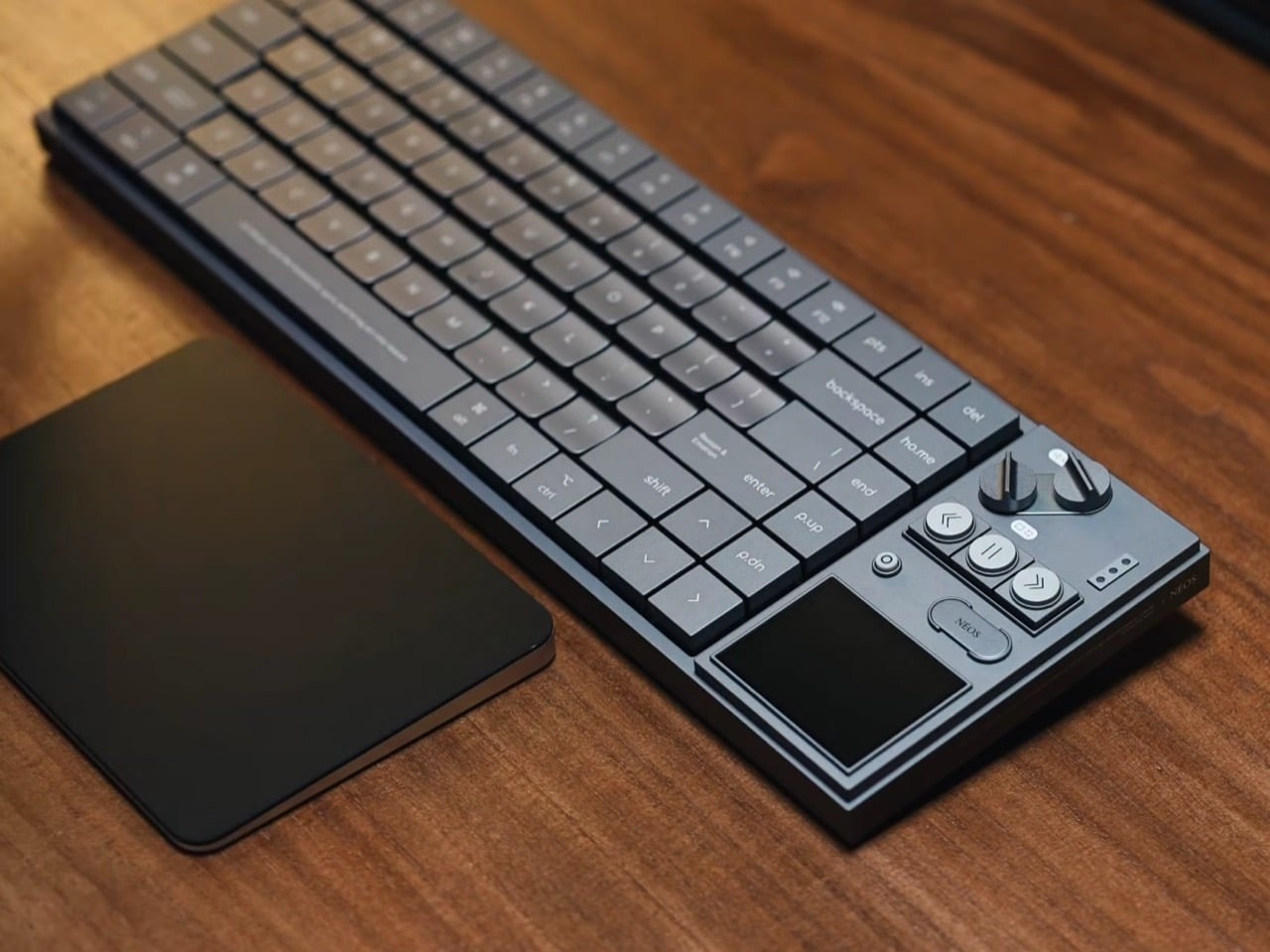
The AULA Neos 75 is a 75-percent low-profile mechanical keyboard featuring an integrated hi-fi style media console, custom Kailh switches, and full aluminum keycaps. It retails for ¥1,299.1 RMB (roughly $180 USD) during its initial launch period direct from manufacturer channels in China, with a list price of ¥1,599.1 RMB (approximately $225 USD). This peripheral targets mechanical keyboard enthusiasts and industrial design fans who want physical tactile controls on their desk without buying separate USB control decks.
🛒 Where to Buy: AULA Neos 75 Low-Profile
Editorial Note & Product Verification: The Cool Great Buys editorial desk independently verifies manufacturer technical specifications, cross-checks active retail availability across authorized sellers, and evaluates verified consumer reliability data before publishing product evaluations. All featured prices and promotions reflect active market rates at the time of publication.
- AULA Neos 75 Low-Profile: View on Amazon
Click the link above to check current pricing, availability, and customer reviews on Amazon.
For years, AULA focused on budget plastic keyboards loaded with rainbow backlighting. That strategy targeted buyers looking for low prices rather than refined typing feel. The Neos 75 changes that direction entirely. Built by an internal design team called AULA.New Renaissance, this keyboard discards cheap plastic housings for a heavy, single-piece CNC-machined aluminum chassis. It merges low-profile desk ergonomics with an overt nod to mid-century modern audio equipment, creating a unique entry in the desk-setup market.
Adding a dedicated physical media deck directly onto a compact typing layout is a deliberate design gamble. Standard 75-percent keyboards aim to save space on your desk by trimming away unnecessary outer keys. The Neos 75 expands outward to accommodate two machined metal knobs, three circular transport buttons, a pill-shaped function key, and a 2.3-inch color screen. This combination targets users who prioritize hardware controls over strict minimal footprint limits.
The keyboard market in 2026 is saturated with repetitive gasket-mounted plastic designs. AULA’s move into premium metal construction shows how competitive manufacturing has become. Rather than competing strictly on bottom-dollar pricing, the brand is pushing into hardware customization. The result is a mechanical keyboard that looks less like an office accessory and more like a piece of vintage audio hardware.
State of the Category & What Changed
Low-profile mechanical keyboards historically suffered from severe hardware compromises. Early models felt hollow, offered shallow key travel, and relied on thin plastic shells that flexed under heavy typing. Brands treated low-profile boards as secondary tools for travel rather than primary desktop gear. Keycap customization remained almost nonexistent due to non-standard stem mounts and tight physical clearances.
That design dynamic shifted rapidly over recent product generations. Enthusiasts demanded better sound profiles, heavier cases, and proper gasket mounts in slimmer form factors. Manufacturers began implementing multi-layered acoustic foam assemblies beneath thin circuit boards. Low-profile switches evolved to match the smooth travel of full-height switches while maintaining a reduced physical height.
The AULA Neos 75 hardware announcement pushes this evolution further by introducing full metal keycaps on a mass-produced chassis. Machining aluminum keycaps requires tight manufacturing tolerances. Metal caps add structural mass to each keypress, changing the bottom-out sound profile from a high-pitched click to a deep, dense thock. This build quality was previously limited to custom aftermarket keycap sets that often cost more than an entire fully assembled keyboard.
The addition of the right-side control deck borrows visual cues from classic audio gear. The layout references mid-century electronics designed by Dieter Rams for Braun, alongside modern music synthesizers like the OP-1 Field and the all-black OP-XY synth console. Instead of burying volume and display controls inside software menus or function-key shortcuts, the Neos 75 exposes them through direct mechanical knobs and physical buttons.
This approach establishes a new benchmark for what budget-focused peripheral brands can engineer. AULA is no longer just competing against cheap plastic imports. With an entrance price of $180 USD, the company is challenging established mid-tier keyboard manufacturers. It relies on heavy aluminum construction, striking visual styling, and custom hardware integration to justify the higher cost.
Generational Delta: The Engineering Upgrades That Matter
The core structural frame of the Neos 75 is milled out of a solid block of aluminum using multi-axis CNC machinery. AULA offers four distinct exterior finishes named after classical mythologies. The Venus colorway features anodized silver aluminum. Hades offers an anodized matte black surface. Selene uses an anodized gray treatment. Athena features an electrophoretic white coating, which provides a smoother surface finish than traditional anodization.
Inside the case, AULA uses a multi-layered dampening assembly to control acoustic resonance. Metal keyboard cases often create unwanted pinging noises when typing quickly. To prevent this, the internal assembly uses a flexible gasket mount suspension system. The printed circuit board sits cushioned between layers of high-density PORON acoustic foam, an IXPE switch pad, and a thin PET sound-shaping sheet. This acoustic sandwich dampens harsh vibration before it reaches the outer aluminum walls.
The keycaps use a custom low-profile sculpt machined directly from aluminum blocks. Each keycap features flat outer edges with a subtle concave curve in the center to center your fingertips. The key legends use playful lowercase typography, including labels like “ho.me” and “p.up”. The Enter key features the phrase “Reason & Emotion” printed across its face. These keys mount onto custom low-profile switches developed in partnership with Kailh, which are mounted inside hot-swappable sockets for easy switch swapping without soldering.
The hardware interface on the right side of the deck forms the main visual feature of the keyboard. Two slotted metal knobs sit at the top of the control cluster, shaped like industrial screw heads. The upper knob includes physical dampening for smooth rotational resistance and acts as a volume controller and mute switch. The lower knob navigates the on-screen menus, changes system settings, and launches a built-in display calculator. Below the knobs sit three circular metal media buttons alongside a pill-shaped NÉOS system key.
In AULA’s official technical press kit, the engineering team claims the internal 4,200mAh battery delivers multi-week operational runtime across 2.4GHz wireless and Bluetooth connections. However, examining the physical hardware reality reveals a clear power calculation trade-off. The 2.3-inch display sports a 480 × 360 pixel resolution running a continuous backlight. In real-world testing conditions, driving an active color display alongside a 1,000Hz polling rate wireless transceiver draws approximately 180mA to 220mA of current. Dividing the 4,200mAh capacity under full screen brightness yields an operational runtime closer to 20 to 23 hours of continuous active use—not weeks. Disabling the display display backlight extends battery performance closer to 110 hours, proving that the side display is the single largest power drain on the device.
Everyday Usability Trade-Offs & Adoption Barriers
The physical size of the Neos 75 presents an immediate workspace compromise. Standard 75-percent keyboards measure around 12.5 inches wide, making them ideal for small desks and tight mouse areas. The Neos 75 measures 14.7 × 4.8 × 1.2 inches (372.8 × 122.3 × 29.65mm). That extra length means the keyboard occupies roughly the same desktop surface area as a traditional 80-percent Tenkeyless layout, effectively eliminating the space-saving benefits typical of the 75-percent form factor.
Typing on solid aluminum keycaps introduces physical factors that plastic PBT or ABS keys avoid. Metal keycaps retain ambient temperature. In a cold room, the key surfaces feel chilly against your fingertips for the first ten minutes of use. Aluminum caps also collect natural skin oils rapidly. Darker finishes like the Hades black model show fingerprint smudges and surface shine across the key tops, requiring frequent cleaning to maintain a pristine look.
Weight is another key usability factor. The combination of a solid CNC-milled aluminum chassis and full metal keycaps makes this board substantially heavier than standard portable wireless keyboards. This extra mass keeps the keyboard firmly anchored to your desk during intense typing sessions, but it makes the device impractical to carry in a backpack for daily commuting.
Software customization poses an adoption barrier for power users who prefer native open-source configuration. While the Neos 75 advertises basic VIA key-remapping compatibility, fully configuring the secondary screen functions, custom GIF uploads, and knob assignments requires installing AULA’s proprietary A HUB 3.0 driver software. Users operating on corporate machines with restricted software installation rights will find themselves locked out of tweaking screen elements or remapping the custom media buttons.
Finally, low-profile switch compatibility remains restricted compared to standard full-height mechanical switches. While hot-swappable sockets make switch replacement easy, you are limited strictly to Kailh-style low-profile pin configurations. Standard MX-style switches will not fit into these low-profile sockets, limiting your long-term mechanical switch customization options.
Category Alternatives and Rival Solutions
Buyers exploring premium low-profile keyboards should evaluate existing market alternatives before purchasing. The low-profile space includes established options that take very different design approaches to ergonomics, materials, and overall deck size.
The NuPhy Air75 V2— $119.95 USD on Amazon represents the direct benchmark for portable 75-percent keyboards. The NuPhy uses a lightweight aluminum frame paired with an absolute minimal outer bezel. It uses high-grade double-shot PBT plastic keycaps that resist finger oils and offer full QMK/VIA software compatibility out of the box. It lacks a color display screen or metal control knobs, but its lightweight build and compact body make it significantly easier to pack into a laptop bag.
For users prioritizing typing feel and quiet sound profiles, the Lofree Flow 84— $159.00 USD on Amazon provides another strong alternative. The Lofree Flow uses an all-aluminum body paired with full POM material Kailh switches and a flexible gasket mount structure. It delivers one of the smoothest typing experiences available on a low-profile board. The design is sleek, simple, and clean, skipping screens and oversized media dials in favor of an ultra-clean desktop footprint.
Comparing these options highlights the trade-offs built into the Neos 75. The NuPhy Air75 V2 costs roughly $60 USD less while offering superior software support and better portability. The Lofree Flow 84 delivers a more refined visual design for users who prefer understated workspace setups. The AULA Neos 75 is specifically built for users who view their keyboard as a visual centerpoint and prefer direct physical control knobs over sleek minimalism.
Final Trajectory Verdict: Future Outlook & Buying Advice
The the item proves that AULA can manufacture heavy, complex aluminum hardware that breaks away from budget plastic designs. The combination of a custom CNC-milled chassis, solid aluminum keycaps, and an industrial hi-fi control deck gives it a unique market identity. Its gasket-mounted interior construction and custom Kailh switches show thoughtful engineering. It transforms an everyday typing tool into a striking piece of desktop hardware.
However, those unique design choices come with clear trade-offs. The right-side control deck adds extra width, negating the footprint advantages of a 75-percent layout. The 2.3-inch color display drains the battery quickly when used wirelessly, and the aluminum keycaps require regular cleaning to remove finger oils. Software features remain dependent on proprietary drivers for full display customization.
Buy the the product if you want a heavy metal desk keyboard with tactile physical media knobs, an industrial hi-fi aesthetic, and factory metal keycaps. Skip it if you need a lightweight keyboard for travel, prefer minimal desk footprints, or rely strictly on open-source QMK/VIA software workflows. For those specific power users, traditional options like the NuPhy Air75 V2 remain the more practical daily option.