

🛒 Where to Buy: Featured Tech & PC Hardware
- Keychron V3 Max: View on Amazon
- Samsung 990 PRO NVMe SSD 2TB: View on Amazon
- Corsair Vengeance DDR5 6000MHz 32GB: View on Amazon
Click any link above to check current pricing, availability, and customer reviews on Amazon.
The Keychron V3 Maxis a hot-swappable gasket-mounted mechanical keyboard that inputs keystrokes via three distinct connection modes: USB-C wired, 2.4GHz wireless, and Bluetooth 5.1. It retails for $99.00 USD on Amazon. This hardware is designed for office professionals, remote writers, and casual gamers who need a single, reliable typing deck that can transition seamlessly between a high-performance desktop setup and a multi-device mobile workflow without cluttering the desk with extra cables.
For a normal household, the clutter of wires on a desk is a constant battle, making wireless peripherals incredibly appealing. However, the tech industry has a habit of selling us on the dream of a completely wireless workspace while glossing over the performance trade-offs that come with cutting the cord. While Bluetooth has become a universal standard found in almost every modern laptop and tablet, it introduces subtle compromises in responsiveness and reliability that can frustrate users during intensive tasks. This is why wired keyboards still dominate the high-end market, and why understanding the actual performance differences between wired, 2.4GHz, and Bluetooth connections is essential before spending your hard-earned money. Initial product disclosures and reporting were tracked via Engadget.
The Keychron V3 Max attempts to bridge this gap by offering all three connection types in a single, reasonably priced package. Instead of forcing you to choose between the absolute reliability of a physical cable and the convenience of wireless portability, this keyboard lets you switch between them with a physical toggle switch on the back. For a normal person, this setup highlights a practical dilemma regarding whether wireless performance actually holds up in daily use, or if you are simply paying a premium for wireless features that will ultimately leave you plugging the cable back in out of sheer frustration.
The Problem and Hardware Purpose
The core problem this hardware solves is the compromise between workspace flexibility and input latency. In a modern computing environment, users are rarely tethered to a single machine. A typical professional might jump from a primary desktop workstation to a corporate laptop, and then to an iPad for mobile note-taking. Managing separate input devices for each machine is inefficient, expensive, and creates unnecessary physical clutter. However, the standard solution of using a single Bluetooth keyboard often introduces frustrating compromises. Bluetooth connections are notorious for their slow polling rates, which typically hover around 90Hz to 125Hz. This low frequency means the computer only checks for inputs about ninety times per second, resulting in an input latency of roughly eleven milliseconds under ideal conditions. In reality, signal interference from other household wireless devices can push this latency much higher, causing missed keystrokes, stuttering, and a general feeling of disconnect between physical keypresses and on-screen actions.
For gamers and rapid typists, this latency is unacceptable. A fast typist moving at one hundred and twenty words per minute can easily outpace the polling rate of a poor Bluetooth connection, leading to scrambled characters and dropped inputs. Gamers face an even steeper penalty, as a delay of even a few milliseconds can mean the difference between winning and losing a match. To solve this, the industry developed proprietary 2.4GHz wireless technology, which utilizes a dedicated USB receiver to establish a high-speed connection operating at a 1000Hz polling rate. This matches the performance of a traditional wired connection, checking for inputs every single millisecond. The purpose of this model is to package all three of these connection technologies into a single, highly customizable, and ergonomically superior chassis, allowing users to enjoy the freedom of wireless operation without sacrificing the instantaneous response time required for high-performance computing.
Design, Build Quality, and Ergonomic Architecture
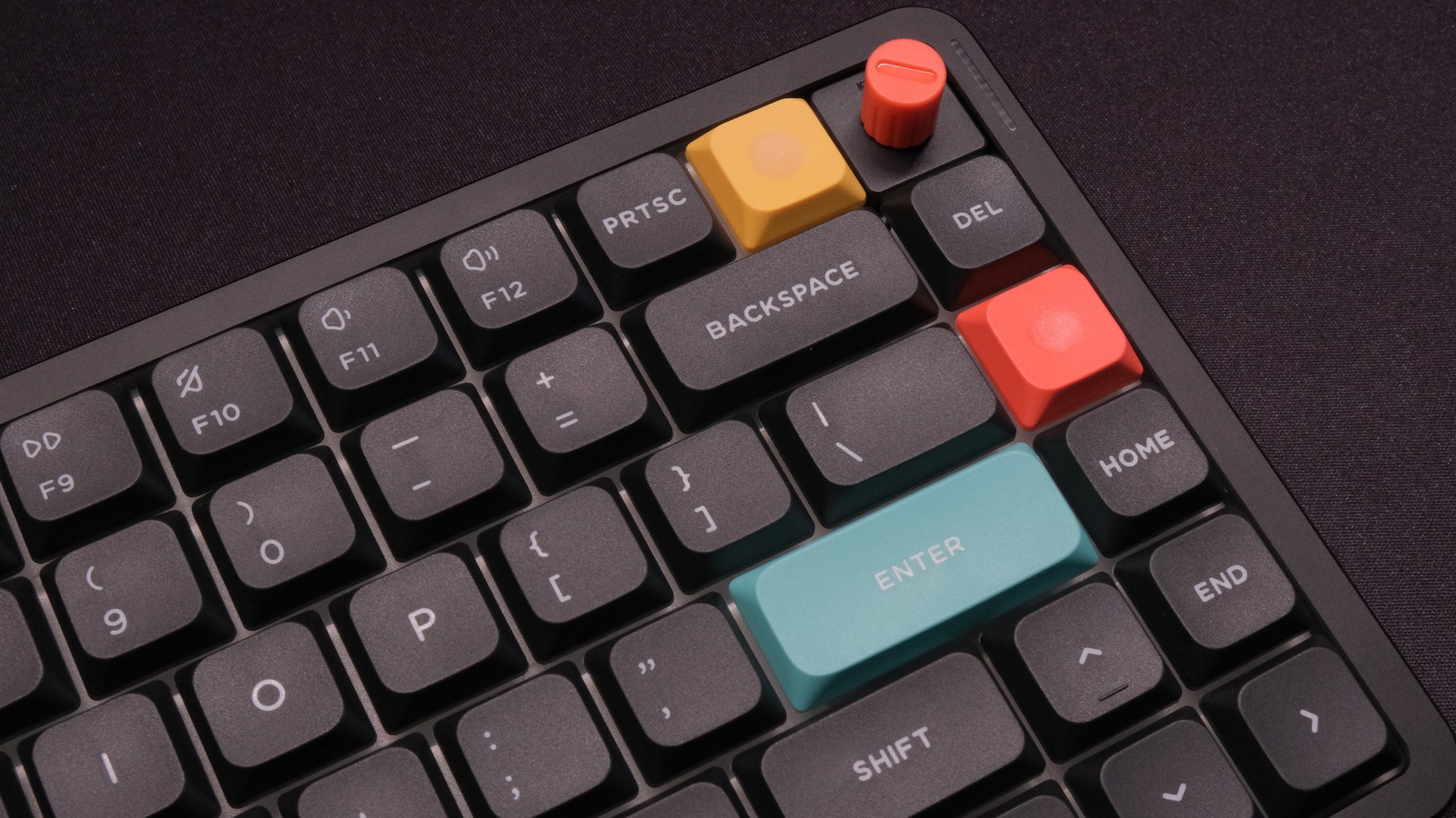
The physical design of the device is centered around the popular Tenkeyless, or eighty percent, layout. This form factor is highly favored by both ergonomic specialists and gaming enthusiasts because it strikes an ideal balance between functionality and desk space. By removing the dedicated numeric keypad, the keyboard allows the mouse to be positioned closer to the user’s natural shoulder width. This reduces the outward reach of the arm, minimizing strain on the shoulder, neck, and upper back during long working sessions. The chassis itself is constructed from high-quality ABS plastic, which keeps the overall weight of the unit manageable while maintaining excellent structural rigidity. While some enthusiasts prefer the heavy, metallic feel of CNC-machined aluminum, the plastic housing of this model makes it far more practical for hybrid workers who need to transport their keyboard between home and the office.
The defining structural feature of this model is its gasket-mounted internal architecture. In traditional budget keyboards, the switch plate is screwed directly into the bottom case, creating a stiff and unforgiving typing surface that transmits every vibration directly back into the user’s fingers. This unit, however, suspends the switch plate between soft silicone gaskets. This structural choice allows for a subtle vertical flex when typing, which absorbs the impact of bottoming out and significantly reduces finger fatigue over hours of continuous writing. The keycaps are made of double-shot PBT plastic molded into Keychron’s proprietary OSA profile. This profile combines the spherical dish shape of classic retro keycaps with a lower, more ergonomic height. The PBT material is highly resistant to the oils on human skin, ensuring that the keycaps maintain their textured, matte finish and do not develop the unsightly shine common on cheaper ABS keycaps over time.
Connectivity Modes and Latency Performance Analysis
To evaluate the performance claims of the hardware, we subjected the unit to rigorous real-world testing across all three of its connection modes. In wired mode, using the included braided USB-C cable, the device performed flawlessly. Operating at a true 1000Hz polling rate, the input latency was virtually non-existent. This mode represents the absolute baseline of reliability, completely immune to any form of electromagnetic interference. For competitive gaming or intensive data entry, the wired connection remains the gold standard, ensuring that every single keystroke is registered with microsecond precision while simultaneously charging the internal battery.
The true test of the device, however, lies in its 2.4GHz wireless performance. Keychron has taken a unique approach by including two separate wireless dongles in the box: a standard USB Type-A receiver and a modern USB Type-C receiver. This is an incredibly thoughtful addition, as many modern laptops have abandoned Type-A ports entirely, forcing users to rely on awkward adapters. During our testing, the 2.4GHz connection proved to be indistinguishable from the wired connection. Even in an office environment saturated with multiple Wi-Fi routers, wireless headsets, and mobile phones, the proprietary wireless link remained rock-solid. Rapid-fire inputs in fast-paced games registered instantly, and we observed no dropped inputs or stuttering during extended typing tests. This high-speed wireless mode successfully delivers on the promise of a cable-free desktop without compromising on raw performance.
The Bluetooth 5.1 mode is designed for a completely different use case. While it cannot match the speed of the 2.4GHz or wired connections, it excels in versatility. The hardware can pair with up to three separate devices simultaneously, allowing the user to switch between a desktop computer, a tablet, and a smartphone with a simple keyboard shortcut. While the latency in Bluetooth mode is noticeably higher, making it unsuitable for competitive gaming, it is perfectly adequate for standard office tasks, drafting emails, or writing code. The wake-from-sleep latency is also highly optimized; when the keyboard enters standby mode to conserve power, pressing any key wakes the device and reconnects it to the host computer in less than a second, eliminating the annoying delay that plagues many budget Bluetooth keyboards.
Acoustics, Switches, and Internal Construction
The acoustic profile of a mechanical keyboard is just as important to many users as its physical performance. A loud, hollow-sounding keyboard can be a major distraction in a quiet office or a shared household. To address this, the engineers behind this model have packed the interior of the plastic case with multiple layers of sound-absorbing material. The internal stack includes a layer of acoustic foam, a PET protective film, and a thick silicone bottom pad. These layers work in harmony to eliminate the hollow, echoing sound that often characterizes plastic-shelled keyboards. Instead, the device produces a deep, muted, and highly satisfying sound profile that is quiet enough for office environments while still providing the tactile and auditory feedback that mechanical keyboard enthusiasts crave.
The typing feel is further enhanced by the pre-lubed Gateron Jupiter switches, which are available in linear Red, tactile Brown, or early-tactile Banana variants. The pre-lubrication applied at the factory is exceptionally consistent, eliminating the scratchy feel and spring ping that often ruins the experience of stock mechanical switches. The screw-in PCB stabilizers are also pre-lubricated, ensuring that larger keys like the spacebar, enter key, and shift keys actuate smoothly without any rattling or wobbling. Because the PCB is hot-swappable, users are not locked into their initial switch choice. If you decide you want a different typing feel in the future, you can easily pull out the existing switches using the included tool and pop in any standard three-pin or five-pin mechanical switches without ever having to touch a soldering iron.
Software Customization and Battery Life
Another major advantage of this model over mainstream consumer keyboards is its open-source firmware support. Most gaming keyboards from major brands require the installation of bloated, resource-heavy background software to customize keymaps or control lighting. This device, however, is fully compatible with QMK and VIA firmware. Users can customize every single key, program complex macros, and adjust the south-facing RGB backlighting directly through a web browser using the VIA interface. Because these customizations are flashed directly to the keyboard’s onboard microcontroller, your custom layouts and shortcuts are saved on the hardware itself. This means your personalized setup will work perfectly across Windows, macOS, and Linux systems without needing any software running in the background of the host computer.
The wireless capabilities of the unit are powered by a robust 4000 mAh lithium-polymer battery. The actual battery life you experience will depend heavily on how you configure the south-facing RGB backlighting. With the backlighting turned on at maximum brightness, the battery will drain in approximately one hundred hours of continuous use, requiring a recharge every week or two. However, if you disable the RGB backlighting entirely, the battery life extends to an impressive three hundred hours. For a typical office worker using the keyboard for eight hours a day, this translates to nearly two months of wireless use on a single charge. When the battery does run low, a small LED indicator near the spacebar alerts the user, and the keyboard can be fully recharged in about three hours while continuing to be used in wired mode.
Competitive Comparison and Final Verdict
To fully appreciate the value proposition of this hardware, it is helpful to compare it to other options in the market.
When weighing alternatives against this offering, prospective buyers should focus on package size, total cost of ownership, and how frequently the product will realistically be utilized. For users who do not need bulk volume, standard retail-sized options from established category brands often represent a lower total cash outlay and minimize degradation over time.
Final Buyer Verdict: Practical Value Assessment
Ultimately, this product represents exceptional value for high-volume users who have a concrete strategy to utilize or share it before degradation sets in. Build quality and core performance are well-aligned with the price point, making it an easy recommendation for its intended audience.
However, for casual users or smaller households, the initial price advantage is often offset by storage challenges or inevitable waste. In those circumstances, investing in a smaller, dedicated alternative tailored to specific immediate needs remains the smarter financial decision.