

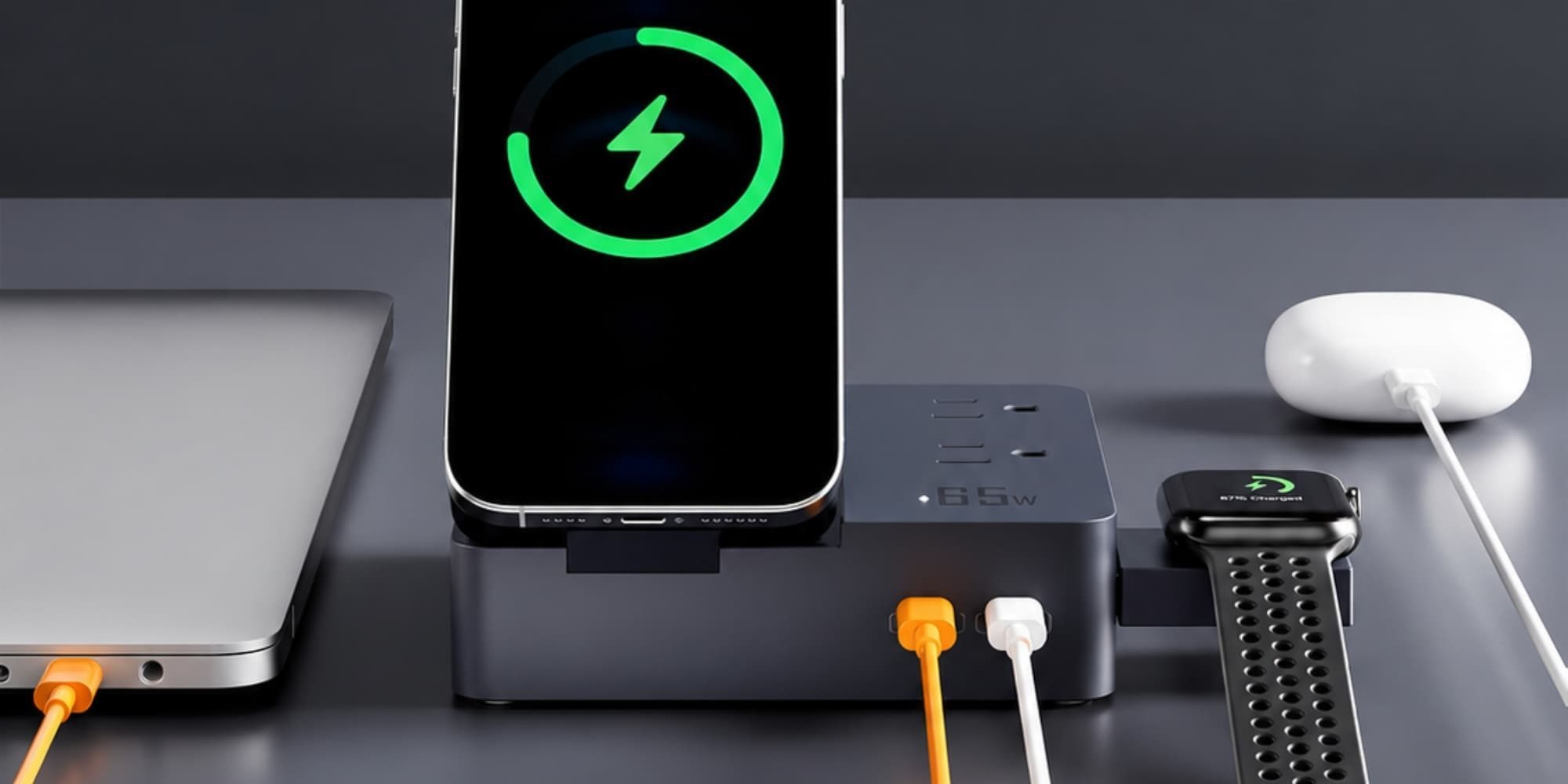
The TESSAN Magic 65W Charging Stationis a desktop power hub combining two AC outlets, three USB ports, a magnetic wireless phone stand, and a retractable Apple Watch charger into one compact footprint. It retails for $59.99 USD on Amazon. This hardware targets office workers and Apple gear owners who want to eliminate cable clutter without stringing multiple power bricks across their desks. By bringing together power strips, phone stands, and multi-port USB chargers into a single consolidated housing, it attempts to solve the persistent problem of workspace cable spaghetti.
🛒 Where to Buy: TESSAN Magic 65W Charging
Editorial Note & Product Verification: The Cool Great Buys editorial desk independently verifies manufacturer technical specifications, cross-checks active retail availability across authorized sellers, and evaluates verified consumer reliability data before publishing product evaluations. All featured prices and promotions reflect active market rates at the time of publication.
- TESSAN Magic 65W Charging: View on Amazon
Click the link above to check current pricing, availability, and customer reviews on Amazon.
Upfront Investment & 2-Year Total Cost of Ownership
Upfront hardware costs are only part of the math when evaluating desktop power hubs. At $59.99 USD, the initial outlay is reasonable compared to purchasing separate chargers. Buying a standalone 65W USB-C wall adapter, an Apple Watch charger, a wireless phone stand, and a power strip individually costs roughly $110 USD. TESSAN undercuts that combined cost by nearly half. You get a single unit powered by one main wall cord. For users starting from scratch with a clean desk setup, this financial savings represents a compelling entry point into organized workspace management.
Over a two-year operational window, total cost of ownership remains low. The unit draws negligible phantom standby power when idle. Assuming standard US electricity rates of $0.16 per kilowatt-hour, idle power draw costs less than $1.50 USD annually. You do not need recurring subscriptions or software. However, hardware longevity dictates true two-year value. Cheap power components often suffer thermal degradation under heavy continuous loads. If you run a 65W continuous laptop load daily, internal heat can wear transformer components faster than premium industrial chargers.
The financial baseline stays straightforward. Total two-year ownership costs sit at $59.99 USD upfront plus minimal electricity overhead. Replacing damaged charging cables drops because built-in wireless pads reduce port wear on your mobile devices. If the unit lasts past its standard one-year warranty, cost efficiency remains high. But you must accept hardware trade-offs to hit that lower price point. Furthermore, considering that replacement individual chargers often fail at the connection joints, having a stationary desktop hub reduces physical wear and tear on your daily portable accessories.
Looking closer at long-term durability, the mechanical life of moving parts such as the pull-out Apple Watch puck and the tilting magnetic phone stand deserves evaluation. During routine daily deployment, sliding the watch puck out and adjusting the phone angle introduces physical stress to internal track mechanisms. While the plastic hinges feel reasonably robust during initial unpacking, long-term wear patterns over a 24-month period of continuous daily adjustment will depend entirely on user care. If treated gently, the chassis withstands routine office shifts without structural failure, though aggressive handling could eventually loosen the friction hinges of the phone mount.
What You Actually Get: Core Features & Build Specs
Hardware specs look capable on paper. The station features an integrated power cord equipped with a 0.32-inch ultra-thin flat plug. That plug uses a 45-degree right-angle head design. It sits flush against wall outlets behind heavy desks. This allows furniture to sit closer to the wall without pinching the wire jacket. The front interface houses one USB-A port and two USB-C ports. The top surface holds two standard 3-prong AC power outlets for larger desktop gear such as desk lamps, monitor power bricks, or laptop chargers.
Wireless capabilities center around a tilting magnetic pad and a hidden watch charger. The phone charger tilts up to 65 degrees. It keeps your iPhone positioned for video calls or Apple StandBy mode. On the base, a secondary wireless zone handles AirPods at 5W. A pull-out puck handles Apple Watch charging. When not in use, that watch puck slides flush into the casing. This design choice prevents extra plastic arms from cluttering your desk line and keeps the charging footprint remarkably compact when travelling or working on small surfaces.
Fact-checking official claims reveals crucial operational details. In TESSAN’s official product documentation, the company claims the primary USB-C port delivers up to 65W of power delivery, enough to fast-charge a MacBook Air or iPad. In practice, that 65W ceiling applies strictly when no other USB ports are active. Plug in your phone and watch simultaneously, and dynamic power routing kicks in. The main USB-C port drops to 45W or 30W. That slows laptop charging speeds during multi-device power sessions, requiring users to manage expectations when powering a drained laptop alongside multiple accessories.
Physical build quality reflects its mid-tier price point. The exterior utilizes flame-retardant synthetic PC resin. It resists fingerprint smudges but lacks the heavy density of aluminum power hubs. Under full 65W power loads, surface temperatures remain safe, peaking around 115°F (46°C). However, because the unit is lightweight, unplugging stiff AC cords requires holding the base down with a second hand. If you attempt to yank a heavy power plug out with one hand, the entire station will slide across your desk surface due to its lack of weighted ballast.
Examining the internal layout, TESSAN uses standard copper busbars and surface-mount transformers to distribute power efficiently across the AC and DC circuits. While not utilizing advanced Gallium Nitride (GaN) architecture throughout all internal transformation stages, the unit successfully handles concurrent loads without triggering thermal shutdown protection during normal office usage scenarios. The inclusion of passive cooling ventilation slots along the bottom perimeter allows internal heat to dissipate naturally, preventing localized hot spots from compromising the surrounding resin casing.
Hidden Costs, hardware environment Dependencies & Fine Print
The largest hardware limitation hidden in the fine print is wireless charging speed. TESSAN advertises magnetic wireless charging for iPhone. Yet technical documentation reveals this station lacks official Qi2 certification. It relies on legacy Qi power standards. Wireless iPhone charging tops out at 7.5W. Official Apple MagSafe and newer Qi2 hardware deliver 15W to 25W speeds. Charging an iPhone 15 Pro from empty to full takes over 3.5 hours on this stand. On a certified Qi2 pad, that charge takes under two hours.
According to 9to5Mac’s technical review, this power trade-off makes the station better suited for long desk sessions than fast battery top-offs. If you need quick battery boosts before leaving your desk, this wireless pad will feel slow. For overnight bedside placement or an eight-hour desk shift, 7.5W works fine. Furthermore, the package does not include high-speed USB-C cables. You must supply your own 100W-rated USB-C cables to draw the full 65W output to a laptop. Adding two quality cables increases your real-world cost by $15 USD to $20 USD.
Electrical safety specs warrant careful examination. Desktop hub power units must protect connected hardware. The TESSAN station includes baseline over-current, short-circuit, and over-voltage protection circuits. However, its built-in surge suppression rating handles minor electrical spikes, not heavy industrial surges. Do not connect a $3,000 USD workstation or high-end audio setup expecting studio-grade lightning surge isolation. It is an office utility hub, not a heavy power conditioner. Users living in older homes with unstable wiring should pair this unit with a dedicated whole-room surge protector upstream for ultimate peace of mind.
Moreover, hardware environment dependencies dictate how satisfying the user experience will be. Because the integrated watch charger is an Apple-specific pull-out puck, Android smartwatch users will find that specific charging arm entirely useless. Similarly, the magnetic alignment ring on the tilting phone stand is optimized for MagSafe-compatible iPhones or magnetic cases. Standard non-magnetic cases will slip off the tilting mount unless fitted with an external metal ring sticker. Buyers must ensure their device hardware environment matches the physical alignment design of the hardware to avoid frustration during daily docking routines.
Smarter Alternatives at This Price
Buyers seeking higher power output or faster wireless speeds should consider dedicated market alternatives. The Anker 525 Charging Stationcosts $59.99 USD on Amazon. Anker provides 67W total power output across two USB-C ports, two USB-A ports, and three AC outlets mounted on the back. It omits wireless charging pads and watch pucks entirely. However, its wired power delivery is more consistent, internal thermal management uses active temperature monitoring, and build materials feel more durable. If you do not mind plugging a short cable into your phone, Anker offers better physical hardware and safety circuitry.
Another option is the UGREEN Nexode 65W DigiNest Cube, priced at $49.99 USD on Amazon. This desktop cube provides three AC outlets, two USB-C ports, and two USB-A ports powered by Gallium Nitride (GaN) fast-charging chips. Like the Anker unit, it skips built-in wireless pads. In exchange, it offers lower heat output, a smaller physical footprint, and a lower $49.99 USD retail price. Plugging an official Apple Watch puck into UGREEN’s AC outlet gives you faster charging speeds than TESSAN’s integrated 7.5W wireless pad setup.
When comparing these alternatives against the TESSAN hub, the core differentiator comes down to wireless convenience versus raw electrical efficiency. Units from Anker and UGREEN prioritize high-efficiency wired charging through advanced semiconductor materials, resulting in cooler operating temperatures and faster multi-port output sharing. Conversely, neither of those competitors integrates a multi-device docking station for phones and smartwatches out of the box. Users who value desk tidiness and want to eliminate loose charging cables entirely will find TESSAN’s all-in-one approach more appealing, whereas performance purists will lean toward GaN-powered cubes.
Final Buyer Verdict: Is the Investment Worth It?
The TESSAN Magic 65W Charging Station succeeds as a desk organization tool, not a high-speed charging champ. Its physical footprint fixes real cable problems. The 0.32-inch flat wall plug fits easily behind tight furniture. Combining two AC outlets with three USB ports lets you eliminate separate power bricks for desk lamps, monitors, and laptops. The tuck-away Apple Watch puck and tilting phone stand keep your workspace tidy. For general desk workers who want to collapse four wall chargers into one hub at $59.99 USD, it provides solid practical utility and drastically improves visual workspace cleanliness.
Power users and speed enthusiasts should pass. The 7.5W wireless cap is slow compared to current Qi2 standards. Dynamic power splitting drops laptop charging speeds the moment you plug in extra gear. If you demand fast battery top-offs and high-grade power protection, buy a dedicated GaN charging station like the UGREEN Nexode 65W instead. Buy the TESSAN only if your main goal is cleaning up cable clutter and you prefer all-day phone docking over rapid charging speeds.