

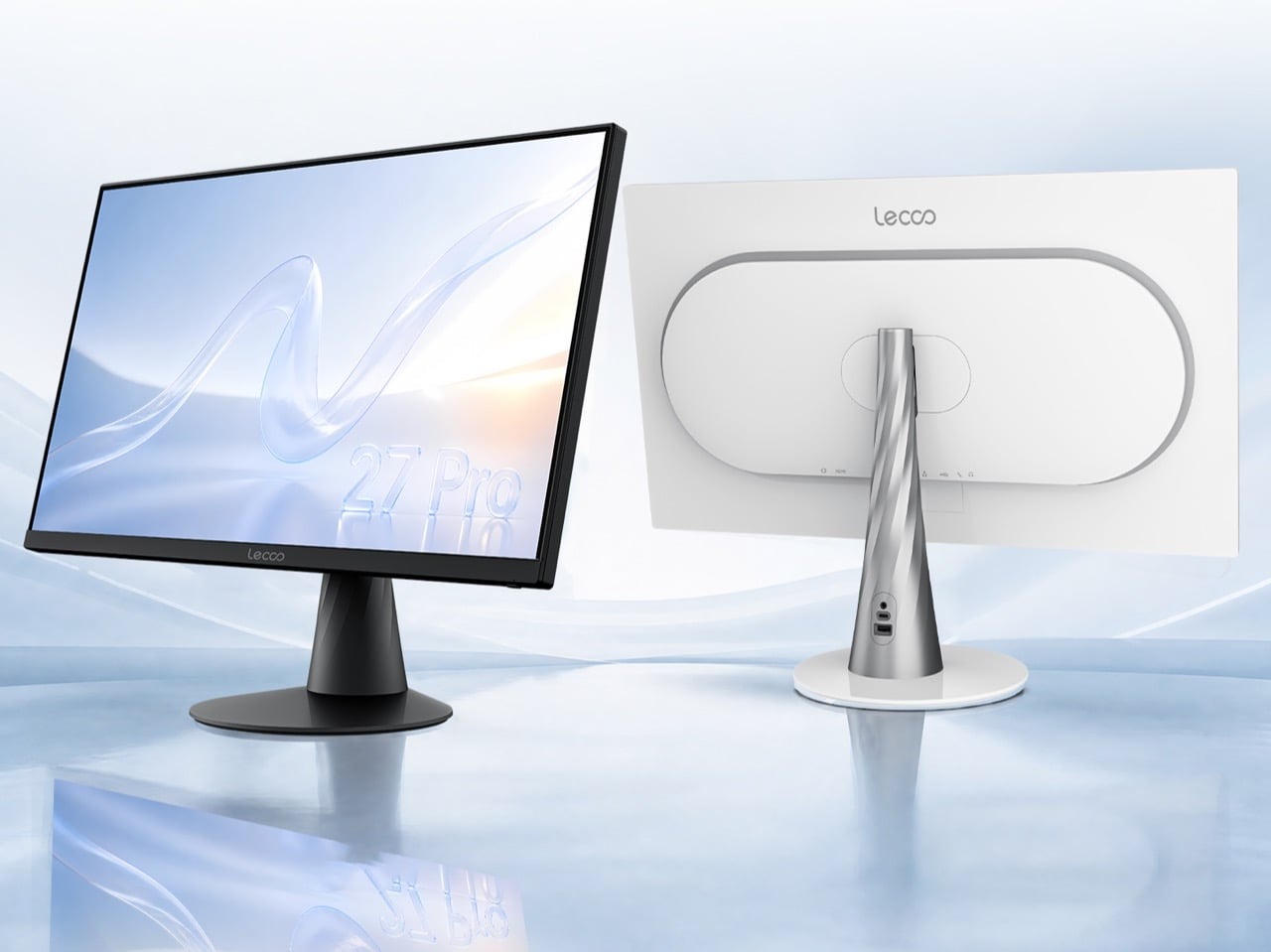
Lenovo’s secondary Lecoo brand has officially expanded its hardware lineup with the Lecoo N27 Pro, a 27-inch all-in-one desktop computer priced starting at ¥4,499 ($671 USD) direct from authorized distributors in China. Designed for home offices, remote professionals, and multimedia spaces seeking a clean desk layout without sacrificing display canvas, this release signals a major shift in how affordable desktop computing hardware approaches screen real estate. As modern work environments increasingly demand versatile multi-window layouts, finding an integrated computing solution that avoids the cramped confines of standard entry-level panels has historically meant investing in expensive workstation tier hardware. Lenovo’s sub-brand attacks this pricing barrier directly, offering a feature-rich desktop replacement that balances raw processing capability with refined ergonomic design principles.
🛒 Where to Buy: Lenovo Lecoo N27
Editorial Note & Product Verification: The Cool Great Buys editorial desk independently verifies manufacturer technical specifications, cross-checks active retail availability across authorized sellers, and evaluates verified consumer reliability data before publishing product evaluations. All featured prices and promotions reflect active market rates at the time of publication.
- Lenovo Lecoo N27: View on Amazon
Click the link above to check current pricing, availability, and customer reviews on Amazon.
Originally known for launching smart home accessories and networking gear back in 2018, Lecoo has steadily climbed the hardware ladder into laptops, mini PCs, and now a full-scale desktop form factor. As detailed in the original Yanko Design product report, this release serves as an accessible entry point for users who want desktop performance and a high-resolution display without paying flagship pricing tiers. The strategic pivot toward all-in-one PCs reflects changing consumer preferences where desk minimalism takes precedence over modular, upgrade-heavy tower cases. By leveraging Lenovo’s vast manufacturing supply chain and engineering expertise, the Lecoo division manages to deliver components that punch well above their weight class, introducing high refresh rate panels and modern mobile processing silicon to a category traditionally dominated by sluggish, legacy-laden office machines.
The Problem and Hardware Purpose
Modern desk setups face a constant battle against clutter, tangled power bricks, and undersized screens that force users to squint at spreadsheets or endlessly juggle overlapping windows. Traditional desktop setups require a separate tower, monitor, keyboard, mouse, and a maze of interconnecting wires that turn a clean workspace into an electrical hazard. The Lecoo N27 Pro solves this hardware consolidation problem by integrating all computing components directly behind a spacious 27-inch panel, leaving only a single power cord plugged into the wall. This architectural consolidation dramatically simplifies office organization, making it an attractive proposition for minimalist workspaces, student dormitories, and shared family rooms where floor and desk space is at a premium.
Priced at ¥4,499 ($671 USD) for the 512GB storage configuration and ¥4,999 ($745 USD) for the 1TB configuration, this all-in-one targets budget-conscious students, home-office workers, and casual creators who need expansive visual workspace. By packing an entire desktop system into a unified chassis, it eliminates the need to purchase a separate display and computer tower, streamlining both the initial purchasing decision and the physical desktop footprint. Beyond mere space savings, the device addresses the common ergonomic flaw of cheap desktop bundles—namely, the inclusion of low-grade, washed-out monitors. By building the entire system around a high-tier display panel, the hardware ensures that daily computing tasks are met with sharp text rendering and vibrant color reproduction right out of the box.
Engineering Architecture & How It Works
Examining the physical and internal design choices reveals a carefully calculated balancing act between cost and capability. According to official technical specifications, the front of the unit is anchored by a 27-inch IPS display running at a crisp 2560×1440 resolution, yielding a clean 109 pixels per inch. Moving beyond standard office hardware, the panel features a 100Hz refresh rate that makes scrolling through long web pages, arranging windows, and general UI navigation feel noticeably smoother than traditional 60Hz displays. Color accuracy is supported by a 99% sRGB color gamut coverage, ensuring dependable hues for casual photo editing and media streaming. The inclusion of a 100Hz refresh rate in an entry-level all-in-one is a notable inclusion, reducing motion blur and eye fatigue during extended periods of reading, coding, or managing intensive workflow dashboards.
Beneath the exterior shell, the system relies on Intel’s Core i5-13420H processor, a 2023 Raptor Lake-H chip utilizing an eight-core architecture split between four performance cores and four efficiency cores. Processing duties are paired with 16GB of RAM and integrated Intel UHD graphics featuring 48 execution units. The physical stand utilizes a tapering stalk with an oval foot, available in Cloud Feather Black and Snow Feather White colorways. To complete the package out of the box, Lenovo includes a matching 2.4GHz wireless keyboard and mouse, with the keyboard engineered to shrug off accidental liquid spills. The internal cooling assembly has been specifically designed to channel airflow efficiently through the thin chassis, keeping fan noise exceptionally quiet even under moderate computational loads.
Real-World Performance Reality
Translating theoretical specifications into daily workflow outcomes shows that the Core i5 processor and 16GB memory pairing easily handles standard productivity tasks. Web browsing with dozens of open tabs, heavy spreadsheet processing, high-definition video conferencing, and multi-window document editing run without stuttering or memory bottlenecks. The integrated Intel UHD graphics handle media playback and basic photo touches with ease, though dedicated gamers will find the graphics architecture unsuited for modern, GPU-intensive 3D titles. When subjected to prolonged compilation tasks or batch image rendering, the Raptor Lake-H processor maintains stable clock speeds without experiencing aggressive thermal throttling, proving that the engineering team successfully managed heat dissipation within the compact enclosure.
Connectivity options are robust for an all-in-one form factor, featuring five USB-A ports, a USB-C port, an HDMI output, and Gigabit Ethernet to bypass Wi-Fi congestion. This port selection accommodates standard office peripherals, external thumb drives, and older legacy hardware without requiring external hubs. While the absence of Thunderbolt or USB4 ports means external graphics card enclosures are off the table, the port layout successfully banishes desktop cable nests, leaving the single power cord as the sole connection to the floor. Audio performance is handled by integrated stereo speakers housed along the bottom bezel, delivering clear vocal reproduction for video meetings and casual music listening without requiring external desktop monitors or Bluetooth speakers cluttering the workspace.
Competitive Landscape: Named Rivals Compared
Evaluating the N27 Pro against current market options highlights how aggressively Lenovo has priced its internal hardware ecosystem. When looking at domestic Lenovo alternatives, the 24-inch IdeaCentre AIO i featuring a comparable Intel processor is listed at $999.99 on Amazon, positioning the Lecoo brand as the more cost-effective avenue for shoppers who prioritize screen estate over name-brand retail distribution in Western markets. The price disparity becomes even more pronounced when factoring in screen dimensions; securing a 27-inch display within major retail channels usually demands a substantial financial premium, making the Lecoo model a disruptive force in the budget desktop tier.
For those considering Apple’s ecosystem, the 24-inch M4 iMac starts at $1,299.00 on Amazon and offers a stunning 4.5K retina display, but on a considerably smaller 24-inch canvas. Furthermore, most competing 27-inch all-in-one systems found on standard retail shelves remain capped at 1080p resolution. The Lecoo N27 Pro delivers a larger, sharper 1440p panel for a significantly lower price point, making it a compelling alternative for users who want maximum screen space without breaking a $700 budget. While Apple’s offering excels in proprietary software integration and display pixel density, it locks users into a restrictive operating system and a smaller workspace, whereas Lenovo’s hardware provides open Windows flexibility and expansive physical screen real estate at half the cost.
Final Buyer Recommendation: Practical Value Decision
For home-office professionals, students, and casual users who want a clean, minimalist desk setup anchored by a sharp 27-inch 1440p display, the Lecoo N27 Pro presents exceptional hardware value. Its combination of a smooth 100Hz refresh rate, capable Raptor Lake-H processing, and generous port selection makes it an ideal productivity hub. Because availability is currently limited to the Chinese market, prospective international buyers will need to monitor import channels or watch for regional rebranding under the Lenovo IdeaCentre lineup as global distribution expands. Navigating cross-border shipping requires careful consideration of local import duties, but for buyers willing to source the hardware directly, the financial savings relative to domestic alternatives are substantial.
Shoppers who need an immediate, warrantied purchase within the US market may find better peace of mind sticking to locally available models like the Lenovo IdeaCentre AIO, despite the higher price tag. However, if this budget-focused sub-brand eventually transitions to wider global retail channels with local warranty support, it establishes a high-value benchmark that higher-priced desktop competitors will struggle to match. Ultimately, the Lecoo N27 Pro redefines what consumers should expect from an entry-level all-in-one computer, proving that large, high-refresh displays and capable multi-core processing do not need to be locked behind four-figure price tags.